Agentic mail merge via Claude or ChatGPT
Ask Claude or ChatGPT to run a merge for you and write everyone on your list a personalized email of their own, not a template with their name in it. DearByDear checks every one, puts them in your Drafts folder to read, sends them one by one from your own mailbox at a pace it can take, and reads the replies.
Claude Desktop, with the DearByDear extension · ChatGPT’s Codex · Free up to 50 people a merge
Sarah Mitchell
sarah@yourcompany.com
James Carter
james.carter@example.com
- Runs the merge
- A note for each person
- In your words and language
- Checks
- Drafts to read
- Paced sending
- Replies sorted
- Follow-ups
A chat can write it. Someone has to post it.
Claude or ChatGPT writes a better email than any template. But a merge doesn’t end when the writing does: it goes out over hours or days, to your mailbox’s limits, and the answers keep coming back for weeks. That part is DearByDear.
Seven hundred emails can take two days within Gmail’s sending limits. DearByDear keeps going while it or Claude Desktop is open, picks up after a restart, and checks your Sent folder so nobody gets the same email twice.
742 people · about 2 daysEach email leaves from your own mailbox, at the pace your provider accepts. If it refuses, DearByDear learns the limit and waits instead of failing.
Gmail · Microsoft 365 · your serverFor 30 days it reads what comes back: replies marked, out-of-office notes told apart, bounced addresses and people who asked to stop put on Do-Not-Disturb.
Replied · out of office · bouncedAn automatic follow-up a few days after each person’s own email, only to those who haven’t answered, as a reply to their email. Up to three, each some days after the one before.
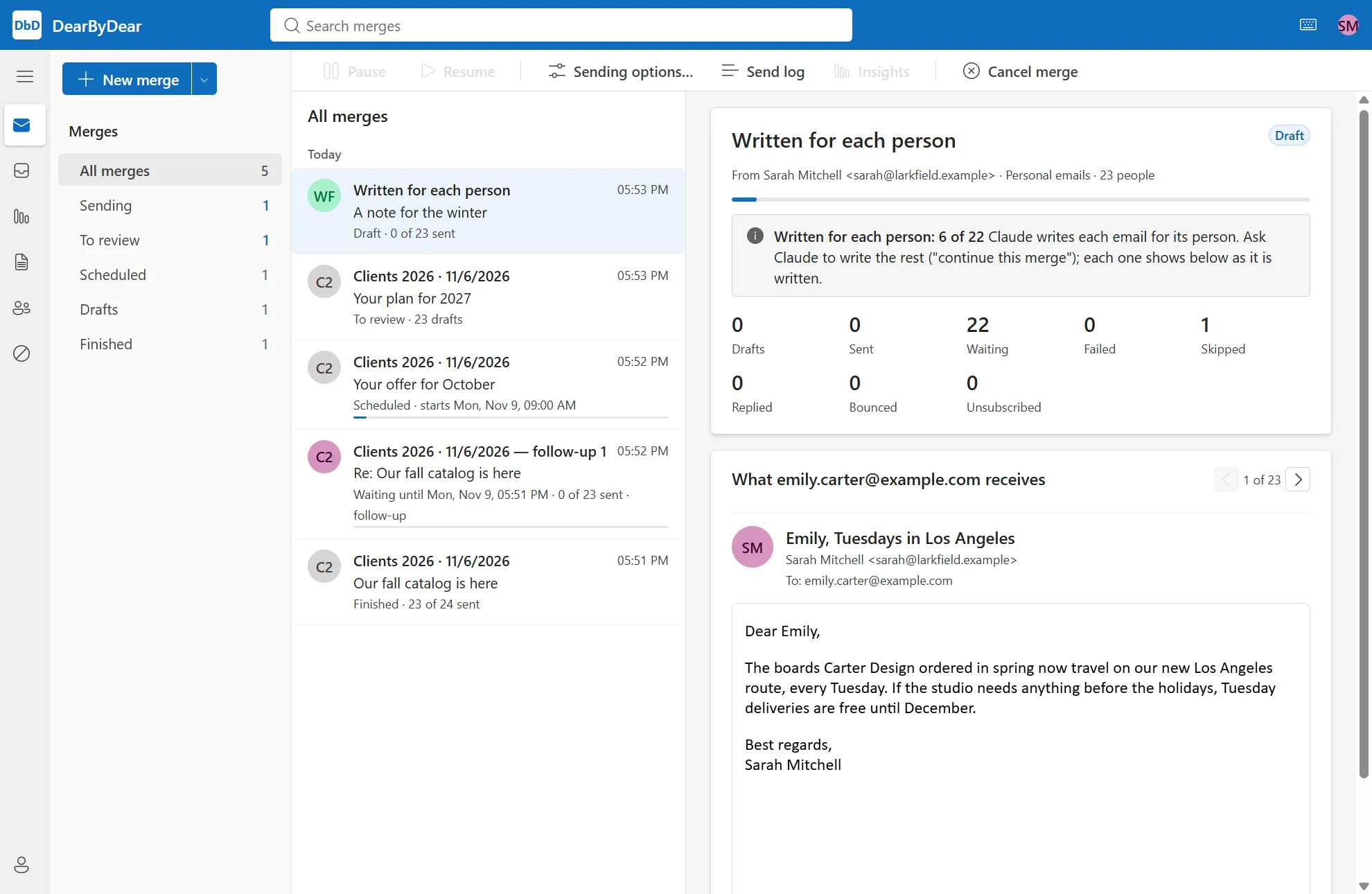
3 days later · no reply yetThe emails your assistant writes go to your Drafts folder first. Read them, change or delete any; nothing is sent until you say so.
120 drafts · waiting for youWho replied and how fast, what the follow-up added, and how each merge compares with your others.
Insights · merge by mergeA tested tool beats code written on the spot.
If you use Claude Code or Codex, you could ask it for a sending script, and for twenty emails from Gmail it would work. A real merge is more: a work mailbox, hundreds of people, and weeks of replies and bounces afterwards. Get it wrong and the emails can’t be taken back, or your provider stops your sending for up to a day.
A script written in a chat runs for the first time on your real list. One wrong column or one loop too many, and everyone gets the same name, or the same email twice. DearByDear works the same way on every merge, checked by hundreds of automated tests, and nothing goes until you say yes.
The same checks · every mergeA script needs your password: pasted into the chat, where the transcript keeps it, or saved in a file or a setting. With DearByDear you type it into a window on your screen. It goes into Windows’ credential store, and your assistant never sees it.
Never in the chatOutlook.com ended password sign-in for mail apps in 2024, and Microsoft 365 turns it off by default at the end of December 2026. DearByDear signs in through Microsoft, in your browser. A script would need an app you register with Microsoft, and its sign-in kept alive.
Microsoft 365 · Outlook.comA sending script needs somewhere to run: Python or Node set up, and your mailbox’s server settings. DearByDear’s tools run on your own computer, next to the app: the extension in Claude Desktop, or the setup DearByDear adds to Codex from its own menu.
Claude Desktop · Codex · your computerA script stops at “sent.” DearByDear reads the bounce reports that come back, in each provider’s own format, and tells “this address doesn’t exist” from “your account is being refused.” It pauses the merge when your provider refuses it, or when too many addresses bounce.
Bounced · refused · pausedEach email is built the way mail apps expect: a plain-text version, its pictures embedded, tables in HTML made for Outlook. Each one’s size is checked against your provider’s limit, and your domain’s SPF, DKIM and DMARC are looked up before you send.
Plain text · pictures · sizeWith Claude or ChatGPT, in four stops
- STOP 1Add DearByDear to your assistantInstall the DearByDear extension in Claude Desktop. For ChatGPT’s Codex, choose Use DearByDear in ChatGPT’s Codex… in the menu under your picture in DearByDear, then Add to Codex; quit ChatGPT completely, open it again and start a new Codex chat. Your assistant then sees your mailing lists, your saved emails and the mailboxes you connected, never your passwords.
- STOP 2Say what you want
Write to my Clients list about the fall offer, a short note for each, from what they bought last.
Your assistant drafts the idea of the email with you first: that’s the brief it writes from. - STOP 3It writes, DearByDear checksEach email is checked as it will arrive: for the right person, naming no one else on the list, footer and links in place. A long list is finished over several chats; nothing written is lost.
- DELIVEREDYou read them, then sendThe emails wait in your Drafts folder. Change any, delete any, then send: at your pace, with the replies sorted and the follow-ups on time.
Your assistant can’t send behind your back.
DearByDear is built so an AI can help without being trusted blindly: what it writes is checked, and what goes out is up to you.
Where your list goes
DearByDear’s servers never see your mailing list or your actual emails: they stay private on your computer, encrypted, as the DearByDear privacy policy sets out. When you ask Claude or ChatGPT to write the emails, the details it writes from are part of your conversation with it, under your Claude or ChatGPT account’s terms, as anything you share in a chat. Would rather not? Write one email with fields and rules instead: then your list stays on your computer only.
Compared
| What it does | Claude or ChatGPT on its own | With DearByDear |
|---|---|---|
| Writes each person their own email | Yes | Yes |
| Hundreds of emails, paced to your mailbox’s limits | A script you’d write and run yourself | Yes |
| Keeps sending after the chat is over | No | Yes, while DearByDear or Claude Desktop is open |
| Nobody emailed twice after a crash | Up to your script | Yes, checked against your Sent folder |
| Your password kept out of the chat | Pasted into the chat or a file | Yes, typed in a window on your screen |
| Signs in to Microsoft 365 and Outlook.com | An app you’d register with Microsoft | Yes, through Microsoft in your browser |
| Each email checked for mix-ups before it goes | No | Yes |
| Drafts to read before anything is sent | A few, if a mail connector allows it | Every one |
| Replies, bounces and unsubscribes read back | No | Yes, for 30 days |
| Pauses when your provider refuses or many addresses bounce | Up to your script | Yes |
| Follow-ups days later, to those who didn’t answer | No | Yes |
| Results merge by merge | No | Yes, in Insights |
Questions
What is agentic mail merge?
A mail merge an AI assistant runs for you. You say what you want; it makes the list, writes each person’s email, has them checked and sets up the merge, and nothing is sent until you say yes. DearByDear is the part that sends, paces and reads the replies.
Can ChatGPT or Claude do a mail merge?
Each can write the emails, but neither sends hundreds of them from your mailbox on its own. With DearByDear, Claude in Claude Desktop and ChatGPT’s Codex in the ChatGPT desktop app can both run a whole merge, from the list to the replies.
Where does it work?
In Claude Desktop, with the DearByDear extension installed, and in ChatGPT’s Codex, in the ChatGPT desktop app, which DearByDear sets up from its own menu. Not in ChatGPT’s ordinary chat or on the web: only Codex starts programs on your computer, so switch from ChatGPT to Codex at the top left and start a new chat there. Both use the same lists, emails and mailboxes as the app.
Do I need Claude or ChatGPT to use DearByDear?
No. On its own, DearByDear sends one email to everyone with their details filled in: fields, text that changes by rule, each person’s own attachment. An assistant is an option for when you want each email written for its person.
What does it cost?
The writing uses your own Claude or ChatGPT plan. DearByDear is free for merges of up to 50 people, and $5 a month or $49 a year for everyone on the list.
How many emails can it write?
As many as your list has. A long list is written over several conversations: DearByDear keeps every email written, and your assistant carries on with the people still left.
Can it send emails without me?
No. Every merge needs your confirmation, and the emails your assistant writes are made as drafts in your mailbox for you to read first.
Does my list go to DearByDear?
Never. It stays on your computer, encrypted. When Claude or ChatGPT writes, it reads what it needs from your list inside your own conversation; DearByDear’s servers aren’t involved.