How to send unique discount codes
Export the single-use codes from your store, put one beside each customer in your spreadsheet, and send the email with the code as a field: each customer gets the code on their own row, in an email of their own. It is a mail merge from Excel with the code as one more column, and a mail merge preview shows each code before anything goes. Your store makes the codes and counts who used them; DearByDear delivers them.
A list with a Code column · your store’s codes · your own mailbox
What you need
Your customers, with one code each in a column of its own. Many stores, or an app for them, make a batch of single-use codes and export them as a file: paste them next to the customers.
| First Name | Code | |
|---|---|---|
| Emily | emily.carter@example.com | LARK-7Q4M |
| James | james.walker@example.com | LARK-2K9D |
| Olivia | olivia.bennett@example.com | LARK-8T3F |
Step by step
- A code on every row
Paste the codes into a column beside the customers, one code to a row. Sort the column so an empty cell shows: DearByDear doesn’t check that every row has a code.
- Bring in the list
New merge, then Who gets it?: A new list, and the spreadsheet.
- Your mailbox, and the kind of email
From which account?: your mailbox. An offer is a marketing email, so choose Campaign: it adds an unsubscribe line and your postal address.
- Write the email
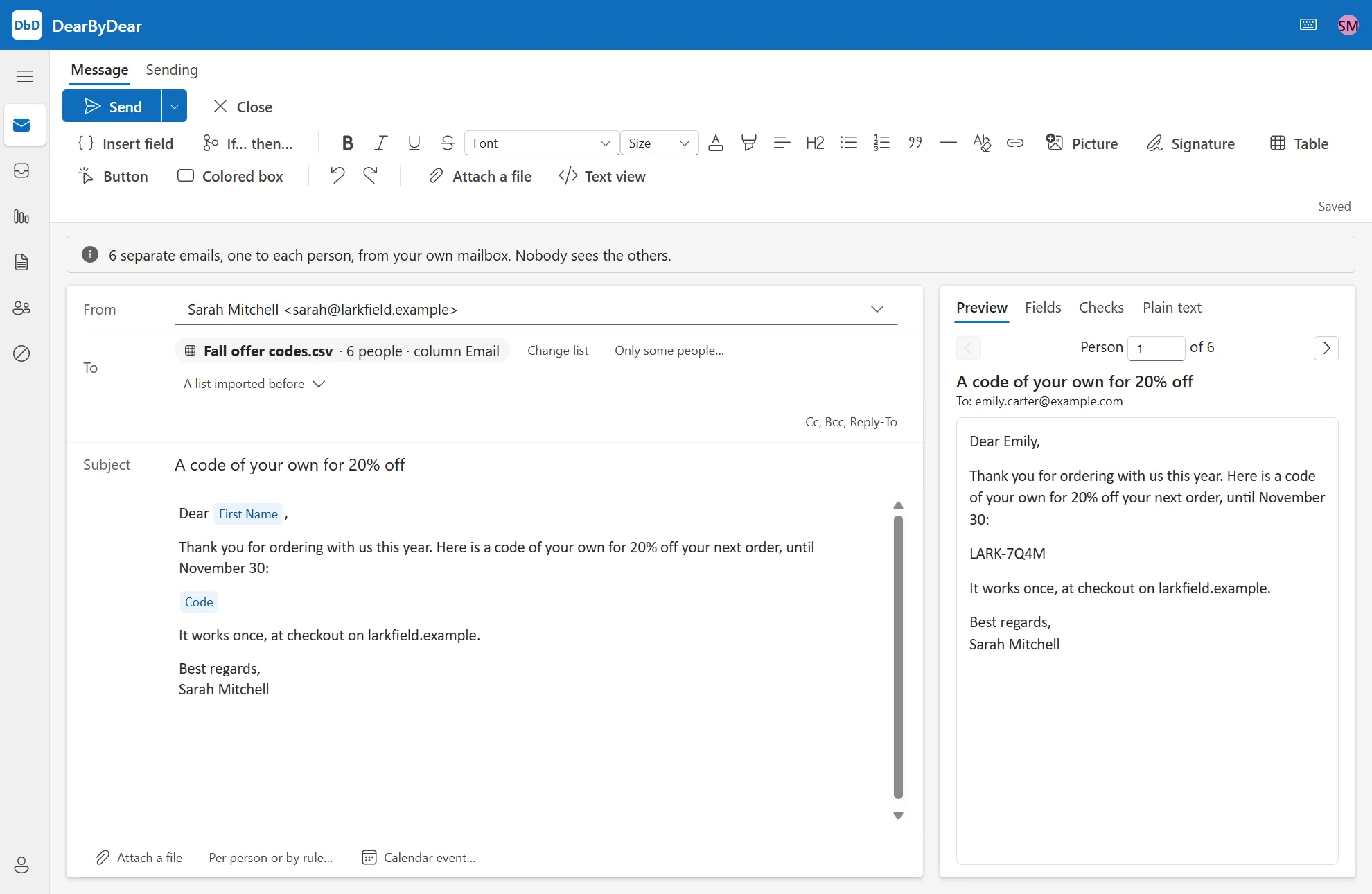
The email: Write a new email, or Start from a template… and Special offer. Insert field puts Code on a line of its own, easy to copy.
- Look at a few codes
The preview beside the email shows each customer’s own code: step through a few, or use Preview each email in Check and send.
- Send
Confirm, and each customer gets theirs, one by one, from your mailbox.
The email
Dear First Name,
Thank you for ordering with us this year. Here is a code of your own for 20% off your next order, until November 30:
Code
It works once, at checkout on larkfield.example.
Best regards,
Sarah Mitchell
First Name from each person’s row in your list
Good to know
- Your store makes the codes, checks them at checkout and counts which were used. DearByDear delivers them.
- One code per row and one row per address: someone listed twice gets one email, with one of their codes.
- An offer to customers is commercial email, which the FTC’s rules ask to carry a way to opt out and your postal address. Campaign mode adds both, as an unsubscribe link in a mail merge.
Questions about discount codes
How do I give each customer a different code?
Put the codes in a column of your list, one per customer, and insert that column in the email as a field. Each email takes the code on its own person’s row.
Can I send them from Outlook?
Yes, from Microsoft 365 or Outlook.com, or from Gmail or any mail server. Each email leaves from your address, one by one, with a copy in your Sent folder.
Will a customer see someone else’s code?
No. Each email is made for one person, from their row alone, and goes to them only.
Is there a ready-made offer email?
Yes: Special offer, among the gallery’s ready-made email templates. Insert your Code field where the offer is.