How to email invoices from Excel
Invoices to clients in the US, the UK or India go out this way, and so do payment reminders and statements. Keep one row per client in Excel, with their email, invoice number, amount and due date, and save each invoice as a PDF named by its number. DearByDear then sends each client an email of their own from your mailbox, the details in the text and their invoice attached: a mail merge from Excel with a different attachment for each person. It sends the invoices your accounting program made; it doesn’t make them. Between businesses in Germany and France, invoices are becoming e-invoices: the questions below say what changes.
An Excel or CSV list · a PDF per invoice · your own mailbox
What you need
One row per client, with a column for each detail the email mentions. Export it from your accounting program or keep it in Excel: amounts and dates come in as Excel shows them on your computer. A Paid column lets a later reminder go to the unpaid alone.
| First Name | Company | Invoice | Amount | Due Date | Paid | |
|---|---|---|---|---|---|---|
| Emily | emily.carter@example.com | Carter Design | 1043 | $1,240.00 | 11/15/2026 | No |
| James | james.walker@example.com | Walker Logistics | 1044 | $860.50 | 11/15/2026 | Yes |
| Olivia | olivia.bennett@example.com | Bennett Studio | 1045 | $2,315.00 | 11/20/2026 | No |
The invoices as PDFs, in one folder, each with its number in its name, as your accounting program saved them:
- Invoice 1043.pdf
- Invoice 1044.pdf
- Invoice 1045.pdf
Step by step
- Bring in the list
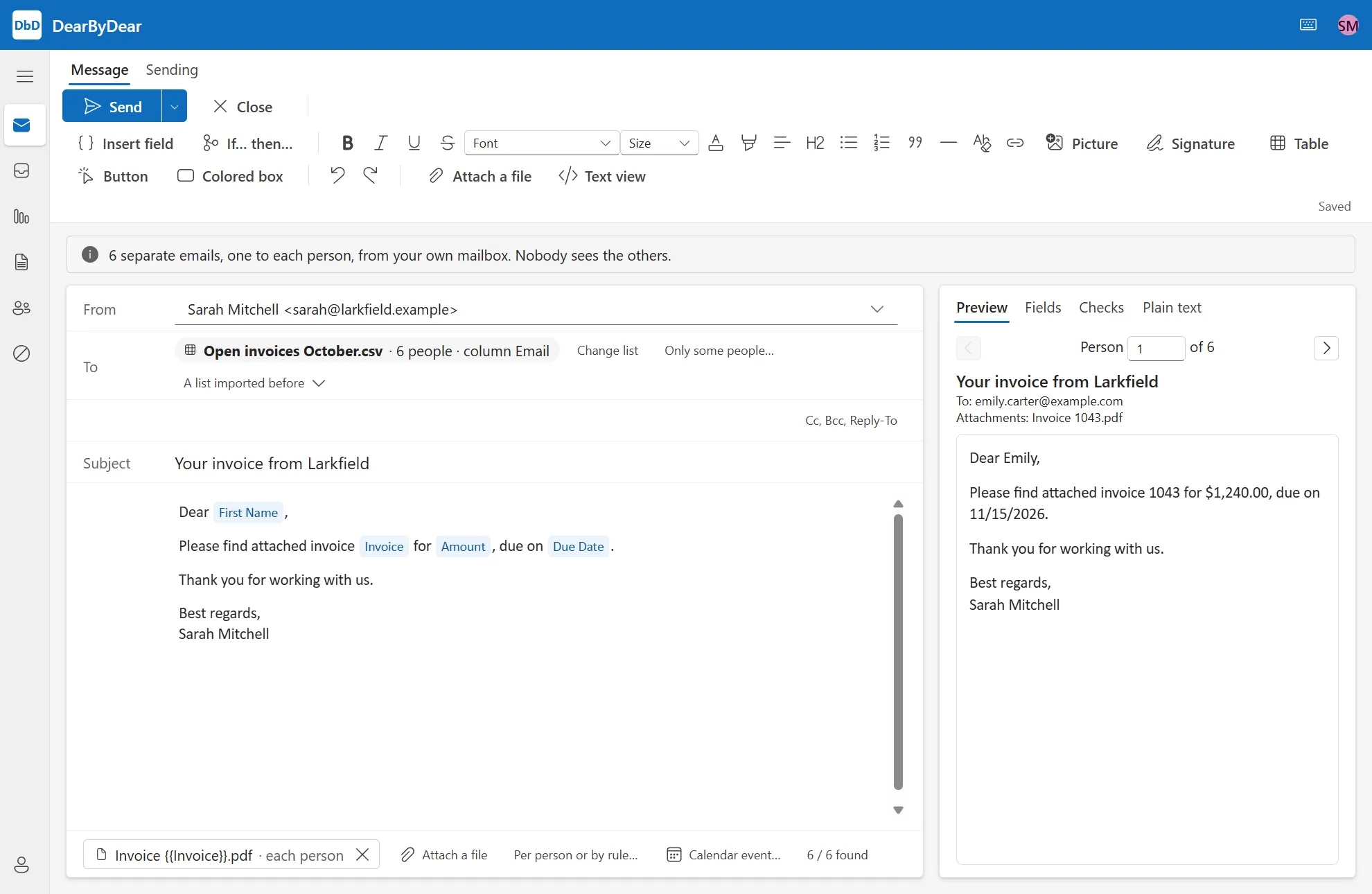
New merge, then Who gets it?: A new list, and the Excel or CSV file. DearByDear finds the email column and says who it will skip, such as a client listed twice.
- Your mailbox, and when
From which account?: the mailbox your clients know, as a Personal email. When does it go out?: Right away, Later, or Drafts to review first.
- Write the email
The email: Write a new email. Insert field puts the Invoice, Amount and Due Date in the sentence where they belong.
- Attach each invoice
Per person or by rule…, then A file for each person. Pick one client’s invoice, and DearByDear works out the name for everyone: Invoice {{Invoice}}.pdf. Under the email, 6 / 6 found means every file is there.
- Check, then send
Send opens Check and send: who gets it and who is skipped, and Preview each email for any client’s email with its file. Send a test to yourself, confirm, and send.
The email
Dear First Name,
Please find attached invoice Invoice for Amount, due on Due Date.
Thank you for working with us.
Best regards,
Sarah Mitchell
Larkfield
First Name from each person’s row in your list
The gallery also has an invoice email and a payment reminder ready to start from: The email → Start from a template….
Good to know
- DearByDear sends the PDF your accounting program made. It doesn’t make invoices, and it can’t list an invoice’s lines in the email: those belong in the PDF.
- Each address gets one email: a client on two rows is skipped the second time. Put a client’s invoices on one row and attach them with a * in the name.
- A reminder to those who haven’t paid is a new merge, sent with Only some people… to the rows whose Paid column says No. The follow-up counts replies; to stop it for those who paid, mark them with Mark who’s done… from your accounting program’s export.
- Each email leaves from your mailbox at your provider’s pace, and a copy lands in your Sent folder.
Questions about emailing invoices
Can I send invoices from Excel without Word?
Yes. DearByDear reads the Excel or CSV file itself and sends from your own mailbox, Microsoft 365, Outlook.com, Gmail or any mail server. Neither Word nor Outlook’s mail merge is needed.
How do I remind the clients who haven’t paid?
Keep a Paid column in the list, start a new merge from the friendly payment reminder in the gallery, and choose Only some people… on the To line: Paid is No. It goes only to those clients, each with their invoice number, amount and due date, and a follow-up seven days later.
Can a reminder go a few days before the due date?
Yes. Time the follow-up from the Due Date column: 3 days before each client’s due date, say, to those who haven’t replied. A second, timed 7 days after the due date, can be the overdue notice. Clients you mark as paid get neither. A client whose reminder would fall before the day after their invoice email gets none.
What if an invoice file is missing?
The count under the email shows it before you send, and Check and send lists who won’t get an email and why. You can skip them and send the rest, or put the file in the folder first.
Can a second email go to clients who don’t answer?
Yes: automatic follow-up emails, a few days later, as a reply to the first, to every client who hasn’t replied. For a client who paid without writing, mark who paid: Mark who’s done… on the merge reads your accounting program’s export of paid invoices, matches it by invoice number or email address, and their follow-ups stop.
What about e-invoices in Germany or France?
Between businesses there, the invoice is becoming a structured e-invoice. In Germany it may still go by email: an XRechnung file or a ZUGFeRD PDF from your accounting program, which DearByDear attaches to each client’s email as it was saved. A plain PDF is accepted only with the client’s consent, and only until the end of 2026, or 2027 for businesses with up to €800,000 in turnover the year before (Germany’s Federal Ministry of Finance). In France, invoices between businesses go through an approved e-invoicing platform, since September 1, 2026 for large and mid-size companies and from September 1, 2027 for small ones (the French Ministry of the Economy). There, DearByDear is for payment reminders and for invoices to consumers and clients abroad. Invoices to consumers aren’t affected in either country.
Can one email carry two invoices?
Yes. A * in the file name attaches every file that matches, so a client’s row can bring all of their open invoices, as long as each file’s name starts with something on that row, such as the company.