DearByDear isn’t out yet. Join the waitlist for 50% off your first year when it launches.

DearByDear
MAIL MERGE · PERSONAL · ONE BY ONE

Every email, addressed by hand.

DearByDear is mail merge software for Windows and Mac. It sends personal emails one by one from your own mailbox: Microsoft 365, Outlook.com, Gmail or any mail server. Each person gets their name, their details and their own attachment.

Free up to 50 people a merge · Windows & Mac · DearByDear’s servers never see your mailing list

FROM
Sarah Mitchell
sarah@yourcompany.com
TO
James Carter
james.carter@example.com
Subject James, your offer for OctoberDear James, your October prices for New York are attached.Attached: Offer-James-Carter.pdfHighlighted: from James’s row in your list
LISTS
  • Excel and CSV
  • Google Sheets
  • OneDrive and SharePoint
  • Outlook contacts
  • Google Contacts
  • People who emailed you
WITH
  • Claude
  • ChatGPT’s Codex

How mail merge works, in four steps

  1. STOP 1Choose the peopleAn Excel or CSV file (mail merge from Excel), a Google Sheet or OneDrive link read fresh each time, your Outlook or Google contacts, or people who emailed you (extract email addresses from your mailbox).
  2. STOP 2Write it onceFields, text that changes by rule, and each person’s own file. Or start from a ready-made email template or a draft you already wrote.
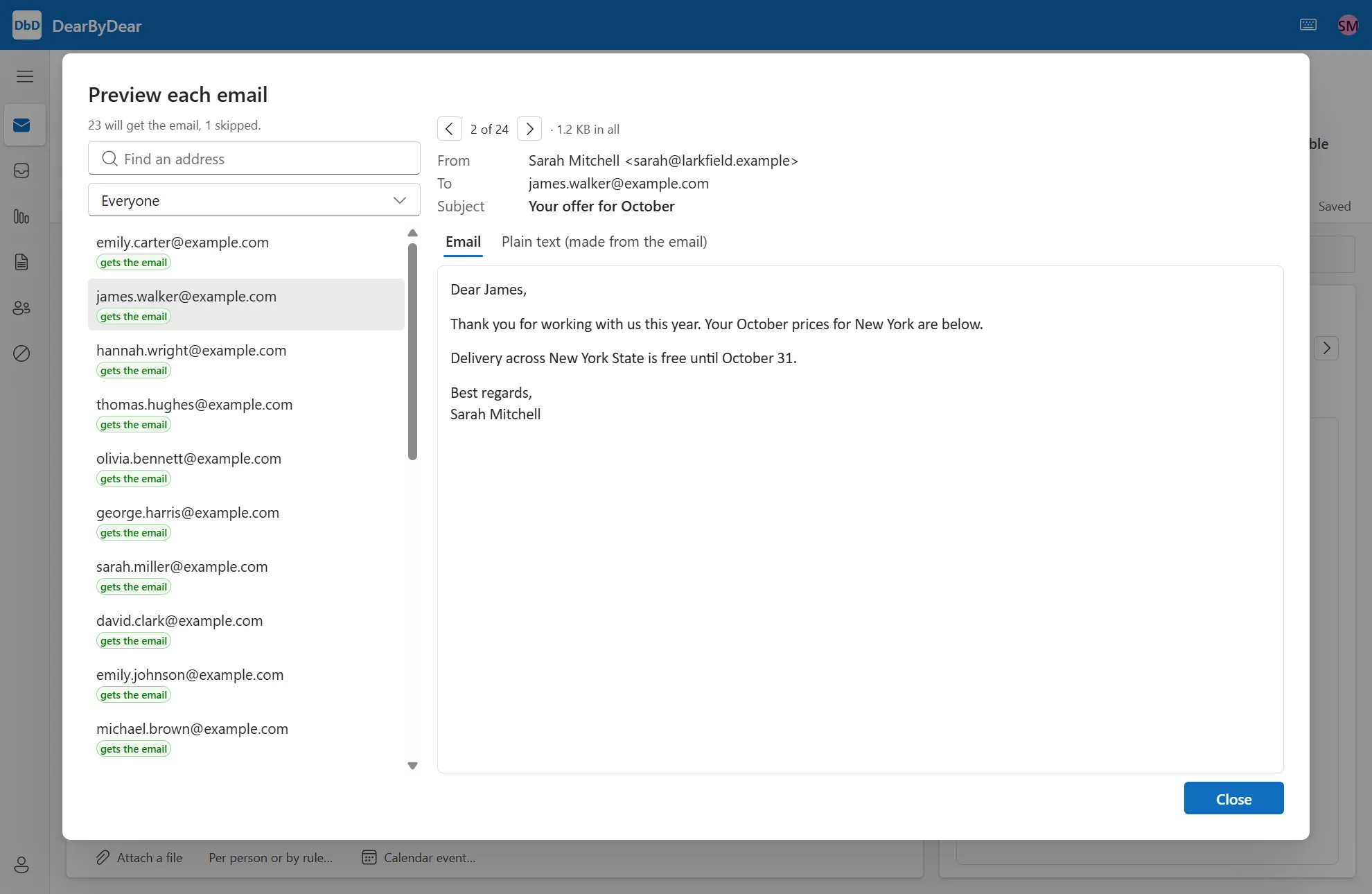
  3. STOP 3Check each oneSee every email as it will arrive, send a test to yourself, and see who is skipped and why. Nothing leaves until you confirm.
  4. DELIVEREDSent at your paceNow, at a set time, spread over office hours, or first as drafts to review. Optionally, an automatic follow-up email goes to those who didn’t answer.
Checking each email of a mail merge in DearByDear: everyone on the list marked “gets the email,” and James Walker’s email exactly as it will be sent.
Stop 3 in the app: Preview each email. 23 people get it; one is skipped for being on the list twice.
RULES AND ATTACHMENTS

One email, a different paragraph and file for each person

Write a paragraph for California, one for New York and one for everyone else, each under its rule. Attach each client’s own invoice by a file name with their client number in it, or by rule. More on mail merge with attachments.
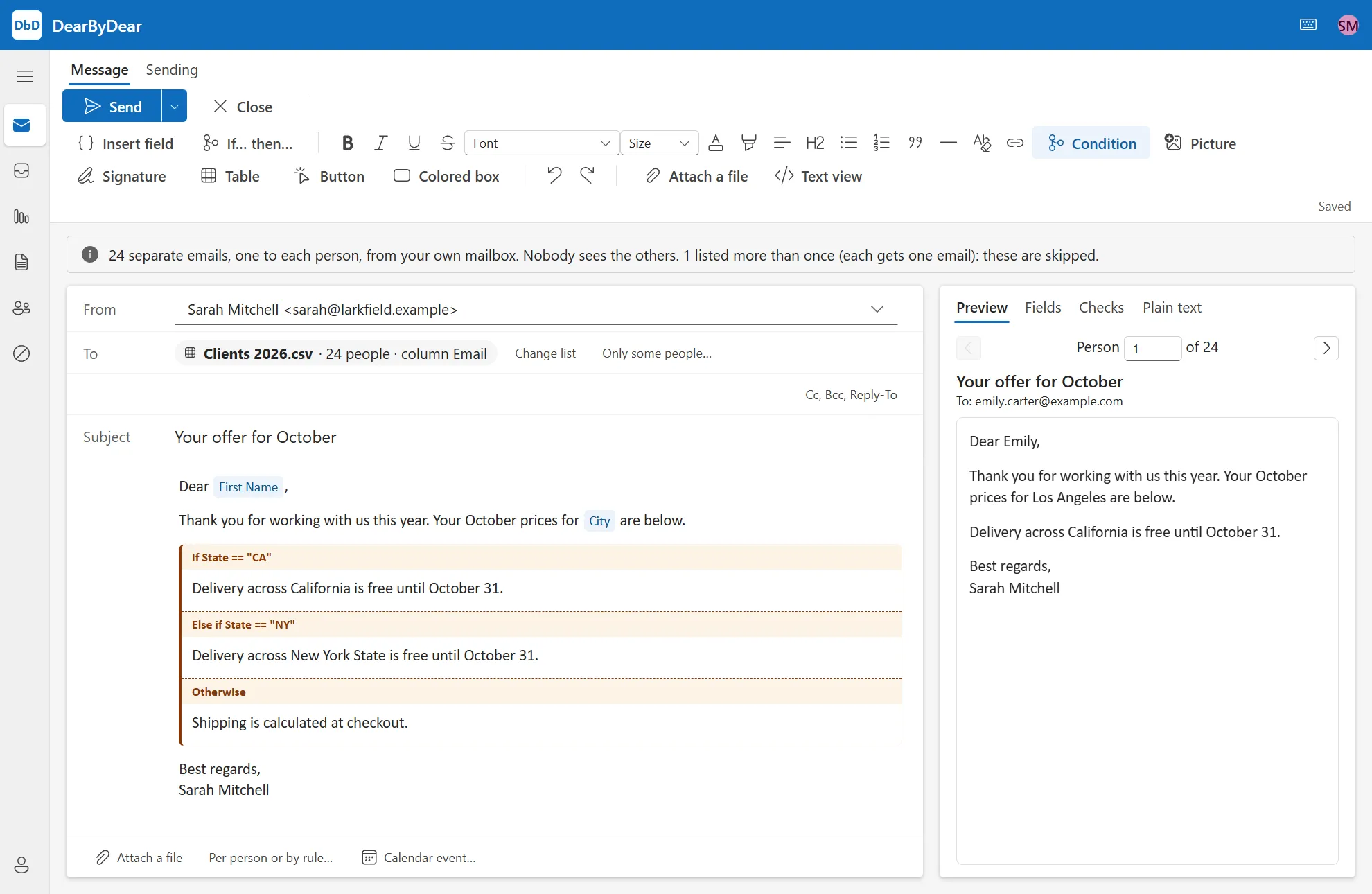
One email with a paragraph for each state in DearByDear: If State is CA, Else if State is NY, and Otherwise, with Emily’s email beside it.
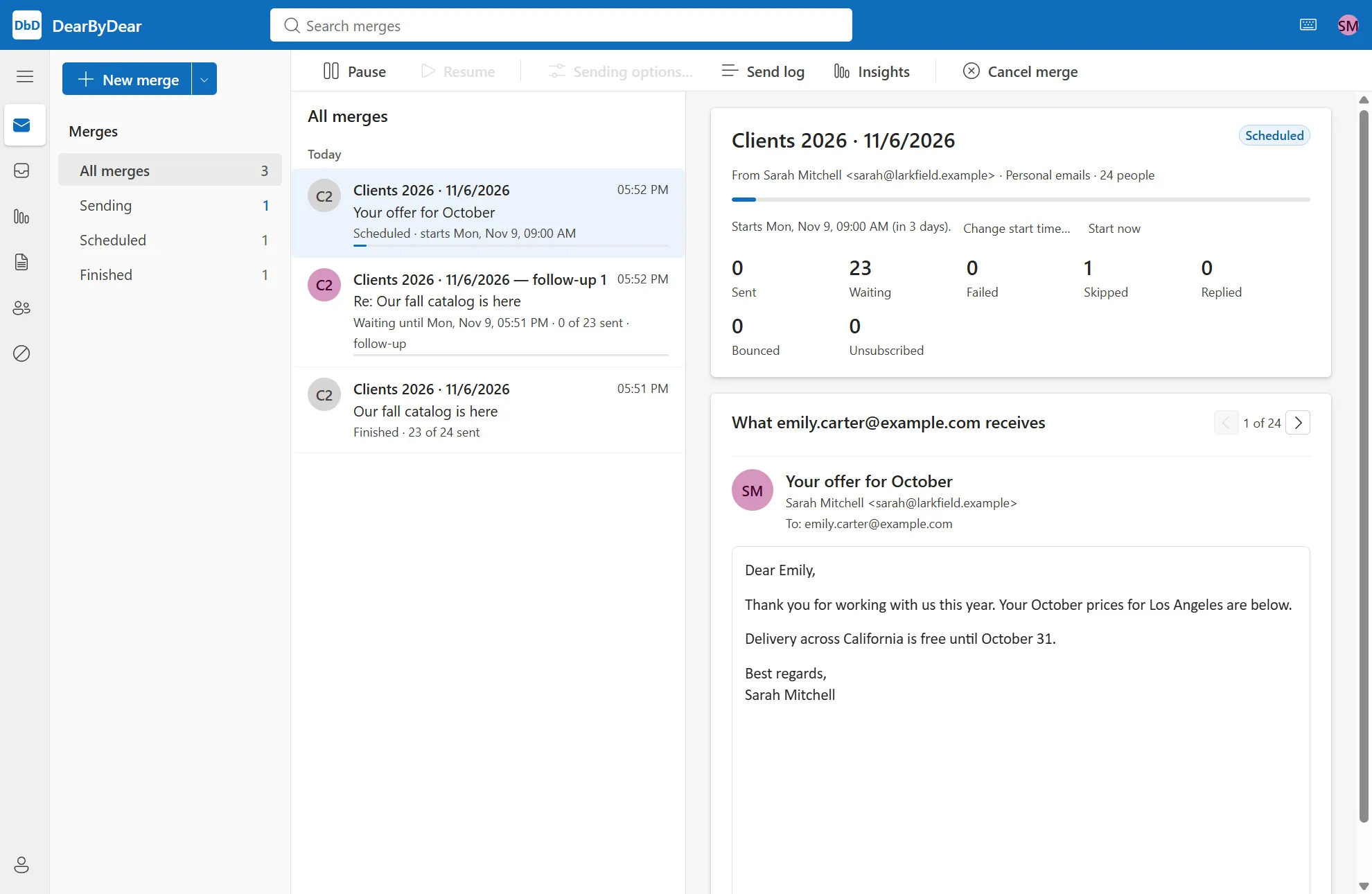
A mail merge scheduled in DearByDear: Clients 2026 starting at 9:00 AM on the next weekday, with Change start time, Start now and Emily Carter’s email.
SCHEDULING

Scheduled, and paced to your provider’s limits

Choose when the merge starts and how fast it goes. DearByDear knows your provider’s daily limit, says when a list will take more than a day, and shows when the last email should go.

REPLIES AND BOUNCES

Replies, bounces and unsubscribes, sorted

For 30 days after a merge, DearByDear reads what comes back while it’s open. Bounced addresses come off the list, people who asked to stop go on your Do-Not-Disturb list, and Insights shows who replied and how fast.

  • emily.carter@example.comREPLIED
  • daniel.price@example.comOUT OF OFFICE
  • office@closed-company.exampleRETURNED · OFF THE LIST
  • olivia.bennett@example.comDO NOT DISTURB

Your list stays private. DearByDear never sees it.

Your list and your emails stay on your computer, encrypted.

ORIGINYour computerYour list, emails and send log, encrypted, with the key in this computer’s credential store.
VIAYour mailboxMicrosoft 365, Outlook.com, Gmail or your mail server, with a copy in your Sent folder.
DESTINATIONEach personOne email, to them alone. Nobody sees who else got it.

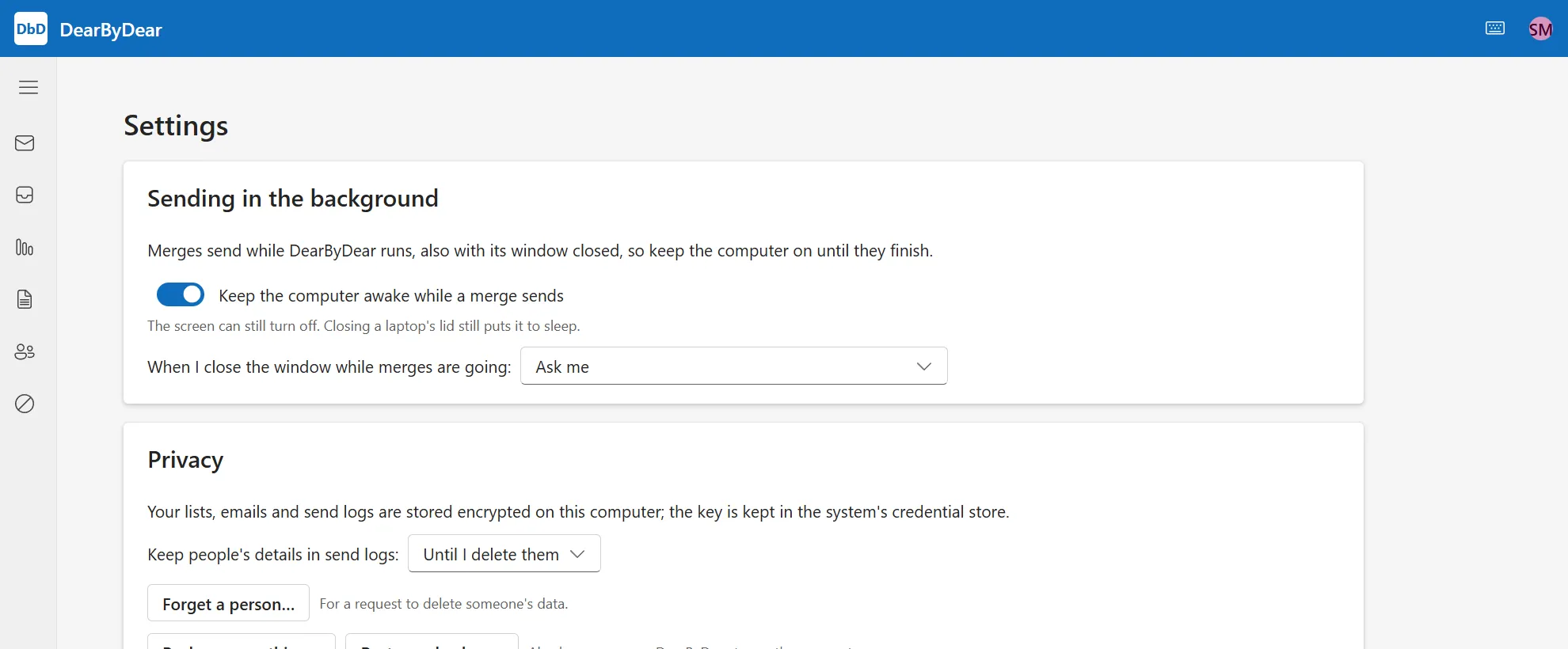
Forget a person on request, out of every list and send log. Choose how long send logs keep people’s details. Back everything up into one file only your password opens, which is also how you move to a new computer. All of it is in the DearByDear privacy policy.

DearByDear’s Privacy settings: your lists, emails and send logs stored encrypted on this computer, how long logs keep details, Forget a person.
MCP · CLAUDE · CHATGPT’S CODEX

Part of your ecosystem

DearByDear speaks MCP, the Model Context Protocol: the open standard AI assistants use to work with the apps on your computer. With the DearByDear extension in Claude Desktop, or in ChatGPT’s Codex in the ChatGPT desktop app, your assistant can do almost everything you do in the app. It works beside the other tools you’ve connected to it, and DearByDear sets Codex up from its own menu.

One set of data

A merge started in the chat shows in the app, and one started in the app shows in the chat: the same lists, saved emails, mailboxes and send log.

Claude Desktop · ChatGPT’s Codex
Rows in, results out

Ask your assistant to make a mailing list from a table in the chat, or from rows it reads through another tool you’ve connected. When the merge is done, it can give back each person’s result: sent, replied or bounced.

A table in · a result for each row out
Your yes

Your assistant asks before anything is sent, and the emails it writes wait as drafts for you to read. Passwords go into a DearByDear window, never into the chat.

Checked, then confirmed by you

When Claude or ChatGPT writes the emails, the details it writes from are part of your own conversation with it, under your Claude or ChatGPT account’s terms.

Agentic mail merge

Mail merge, compared

What it doesDearByDearWord and Outlook mail mergeCloud email-marketing tools
Sent from your own mailboxYesYesUsually from their servers
Your list kept on your own computerYes, encryptedYesUploaded to them
A different attachment for each personYesNoRarely
Text that changes by ruleYesYes, with field codesVaries
Sending spread over hoursYesNo, all at onceYes
Replies and bounces read backYesNoBounces, usually
Follow-ups to those who didn’t answerYesNoVaries
Works in a web browser, on any computerNo: an app for Windows and MacNoYes
Opens and clicks countedNo: replies counted insteadNoYes
A drag-and-drop newsletter designerNo: emails written like a letter, or ready-made onesWord’s own layoutYes
PRICING

Free for up to 50 people a merge

FREE$0Every feature, for merges of up to 50 people. With a longer list, the first 50 get the email and the rest wait until you have a license.Join the waitlist
DEARBYDEAR$5 a monthor $49 a year, which saves $11Everyone on the list, every merge. Two computers per license.Join the waitlist
DEARBYDEAR PRO$10 a monthor $99 a year, which saves $21Everything in DearByDear, plus sending through your own account at an email service, such as Amazon SES, Postmark or SendGrid, from an address on your own domain.Join the waitlist

Not out yet. The waitlist gets 50% off the first year, DearByDear or Pro, monthly or yearly: one code in the launch email, for 30 days after launch.

Sales tax or VAT is added at checkout where it applies. Payments by Polar: DearByDear pricing and licenses.
Easy Mail Merge customer? You get 25% off either plan for your first 12 months; your code comes by email.

Questions

Does it send from my own email address?

Yes. Each email leaves your own mailbox as you, with a copy in your Sent folder. More on mail merge in Outlook.

Where is my list kept?

On your computer, encrypted, with the key in this computer’s credential store. DearByDear’s servers never see your mailing list or your actual emails. If you ask Claude or ChatGPT to write the emails, the details it writes from are part of your own conversation with it, under your Claude or ChatGPT account’s terms.

What does the free version do?

Everything, for merges of up to 50 people. With a longer list, the first 50 get the email and the rest wait; with a license, Send the rest sends it to them.

How many emails can I send a day?

As many as your mailbox’s provider accepts. DearByDear knows the usual limits of Microsoft 365, Outlook.com, Gmail and others, spreads a bigger merge over several days, and waits if a provider says its limit is reached.

Can Claude or ChatGPT help?

Yes: in Claude Desktop with the DearByDear extension, or in ChatGPT’s Codex, in the ChatGPT desktop app, which DearByDear sets up from its own menu. Either can set up a merge for you, or write each person their own email, which you read as drafts before anything is sent. How it works: agentic mail merge with Claude or ChatGPT.

I use Easy Mail Merge. What changes?

DearByDear is its successor, from the people behind it. Its setup guide brings in your Easy Mail Merge templates and your Do-Not-Disturb list, and you get 25% off for your first 12 months. More on moving from Easy Mail Merge.

Will DearByDear be on the Mac?

Yes: it’s coming to Windows and Mac, and the waitlist hears first when it launches.

Coming soon, with 50% off your first year.

Join the waitlistNot out yet · Windows & Mac · the waitlist hears first