Mail merge through your own email service
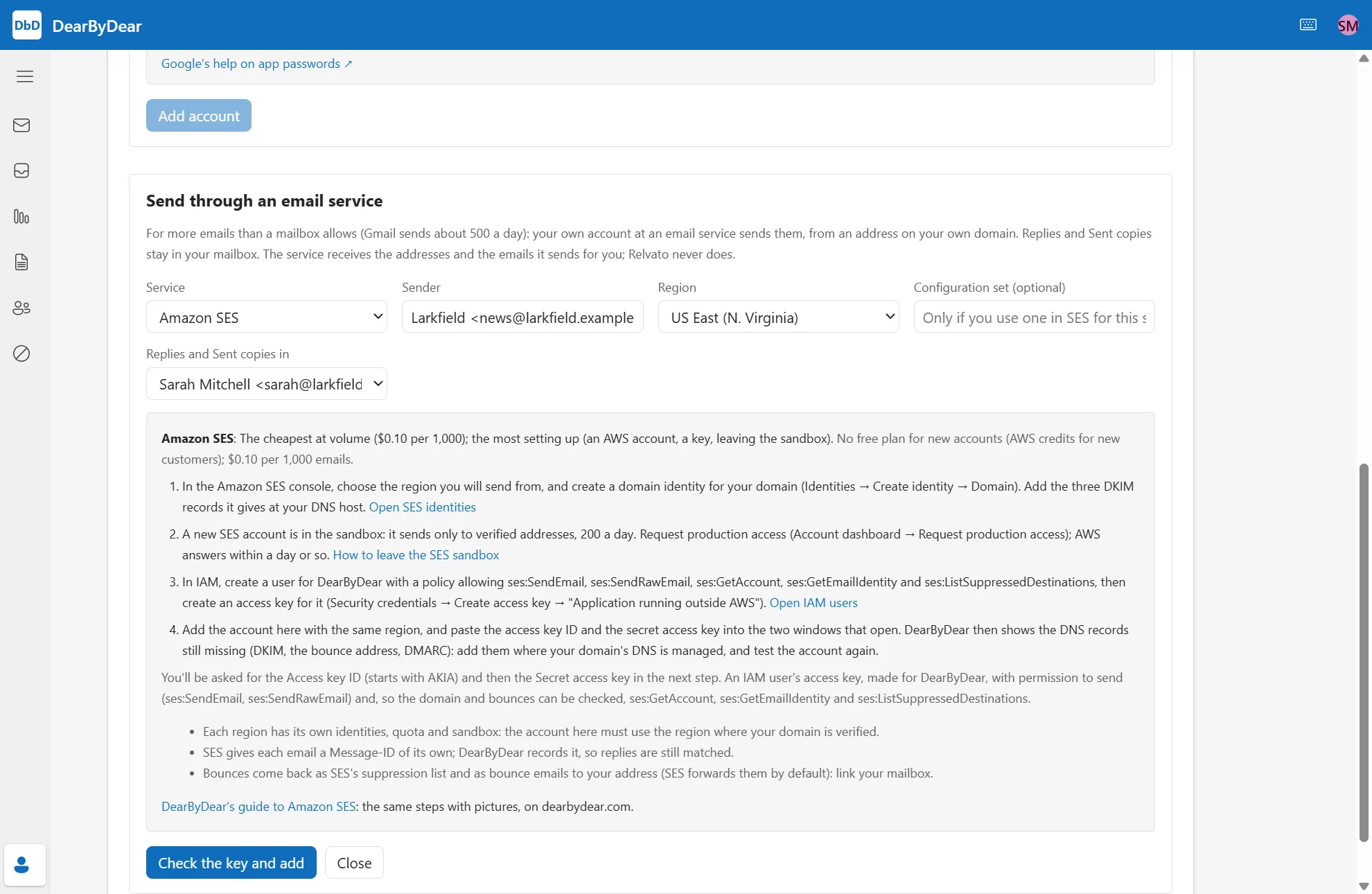
With DearByDear Pro, a mail merge can go through your own account at an email service, such as Amazon SES or Postmark, instead of your mailbox: for more emails than a mailbox sends in a day, from an address on your own domain, with the service’s bounce and complaint reports. DearByDear works with 12 services by name, and any other through its SMTP relay.
DearByDear Pro · $10 a month or $99 a year · DearByDear Pro pricing
Why send through a service
Within Gmail’s sending limits, a free account sends about 500 emails a day, and a Microsoft 365 mailbox 10,000 recipients. A service sends as many as your plan with it allows.
Each provider’s limitsDearByDear reads them from the service every 10 minutes while it’s open, and puts hard bounces and complaints on your Do-Not-Disturb list. Through an SMTP relay, only the bounce emails your mailbox gets count.
From the service’s own reportsWhen you add the account, DearByDear checks the key and, for most services, lists the DNS records still missing: the service’s DKIM, its bounce address, and a DMARC record if your domain has none. To see what your domain has now, check SPF, DKIM and DMARC.
DKIM · bounce address · DMARCThe emails still go from your computer straight to your account at the service. DearByDear’s servers never see your list, your emails or your key; the service sends the emails, so it handles each one, under your agreement with it.
The services, and how to connect each
| Service | What to know | Free plan, then paid |
|---|---|---|
| Amazon SES | Priced per thousand emails; an AWS account, a region, and the sandbox to leave first. | No free plan for new accounts (AWS credits for new customers); $0.10 per 1,000 emails. |
| SendGrid | A restricted API key; the domain must be authenticated, not only a sender address. | 60-day trial (100 a day); Essentials from $19.95 a month. |
| Mailgun | US or EU region; keep its unsubscribe tracking off, or it adds a footer. | Free: 100 a day; Basic from $15 a month for 10,000. |
| Postmark | Personal and Campaign merges on separate streams; a new account sends only to your own domain until approved. | Free: 100 a month; Basic $15 a month for 10,000. |
| Resend | No approval step; a Full access key lets DearByDear check the domain and read bounces. | Free: 100 a day, 3,000 a month; Pro $20 a month for 50,000. |
| Brevo | Sent through its SMTP relay; it tracks every email and adds its own unsubscribe header. | Free: 300 a day; Starter from $9 a month for 5,000. |
| Mailjet | Sent through its SMTP relay, tracking off; a new account may be held to 10 an hour at first. | Free: 200 a day, 6,000 a month; Starter $9 a month for 8,000. |
| SparkPost | For existing SparkPost accounts; new sign-ups get Bird Email, a different service. | As your SparkPost plan. |
| Mandrill | For Mailchimp Standard and Premium customers; the domain needs DKIM and DMARC first. | Mailchimp Standard or Premium, plus $20 per 25,000 emails. |
| MailerSend | Replies matched by sender and subject; bounces read at most once an hour. | Free: 500 a month; Hobby $7 a month for 5,000. |
| SMTP2GO | Tracking and its unsubscribe footer belong to the API key: keep them off there. | Free: 1,000 a month (200 a day); Starter $15 a month for 10,000. |
| Elastic Email | Adds its own unsubscribe link to every email; better for newsletters than personal emails. | Free: 100 a day; Starter $19 a month for 50,000. |
| Any other, by SMTP relay | Bounces count only when they reach your linked mailbox. | As the service prices it. |
Prices as each service listed them on October 25, 2026; theirs may have changed since.
What you need
Everything DearByDear has, plus sending through an email service. Without it, you can add and check the account; a merge through it needs Pro.
$10 a month or $99 a yearThe From address must be on a domain of your own, with access to its DNS to add the service’s records.
sarah@larkfield.exampleOne of your mailboxes, linked to the account: it keeps the Sent copies, gets the replies and holds the drafts you review first.
Accounts → the account’s actions → Linked mailbox…Questions about email services
Can I try it before buying Pro?
Yes, as far as setting up: add the account, check the key, and see which DNS records are still missing. Sending a merge through it needs DearByDear Pro; your mailboxes send without it.
Can I send from my Gmail or Outlook.com address through a service?
No. The From address must be on a domain of your own. Gmail’s, Outlook.com’s and similar providers’ policies would have emails sent from their addresses by another service refused.
Does the service see my list?
It sees each email it sends, with its recipient, as it must to send it, under your agreement with the service. DearByDear’s servers never see your list, your emails or your key.
Do I need a linked mailbox?
It’s what keeps a copy of each email in your Sent folder, gets the replies, holds the drafts when you review first, and tells DearByDear whether an email interrupted by a crash went out. Without one, the service still sends, but replies aren’t tracked.
Why isn’t Zoho ZeptoMail listed?
Its terms allow only transactional email, such as receipts and password resets: newsletters are forbidden, and personal merges likely are too. Someone sending genuinely transactional email can still use it through its SMTP relay.