Mail merge through SparkPost
SparkPost now belongs to Bird, and new sign-ups get Bird Email, a different service. If you have a SparkPost account, DearByDear Pro can send a mail merge through it, in its US or EU region, from a verified sending domain.
With DearByDear Pro · From an address on your own domain · Researched from SparkPost’s own pages, October 25, 2026
Before you start
- DearByDear Pro. $10 a month or $99 a year, with everything DearByDear has. Without it, you can add and check the account; a merge through it needs Pro: DearByDear Pro pricing
- A domain of your own, and its DNS. The From address must be on it, such as sarah@larkfield.example, never @gmail.com or the like: their policies would have the emails refused.
- An account at SparkPost. As your SparkPost plan. As listed on October 25, 2026.
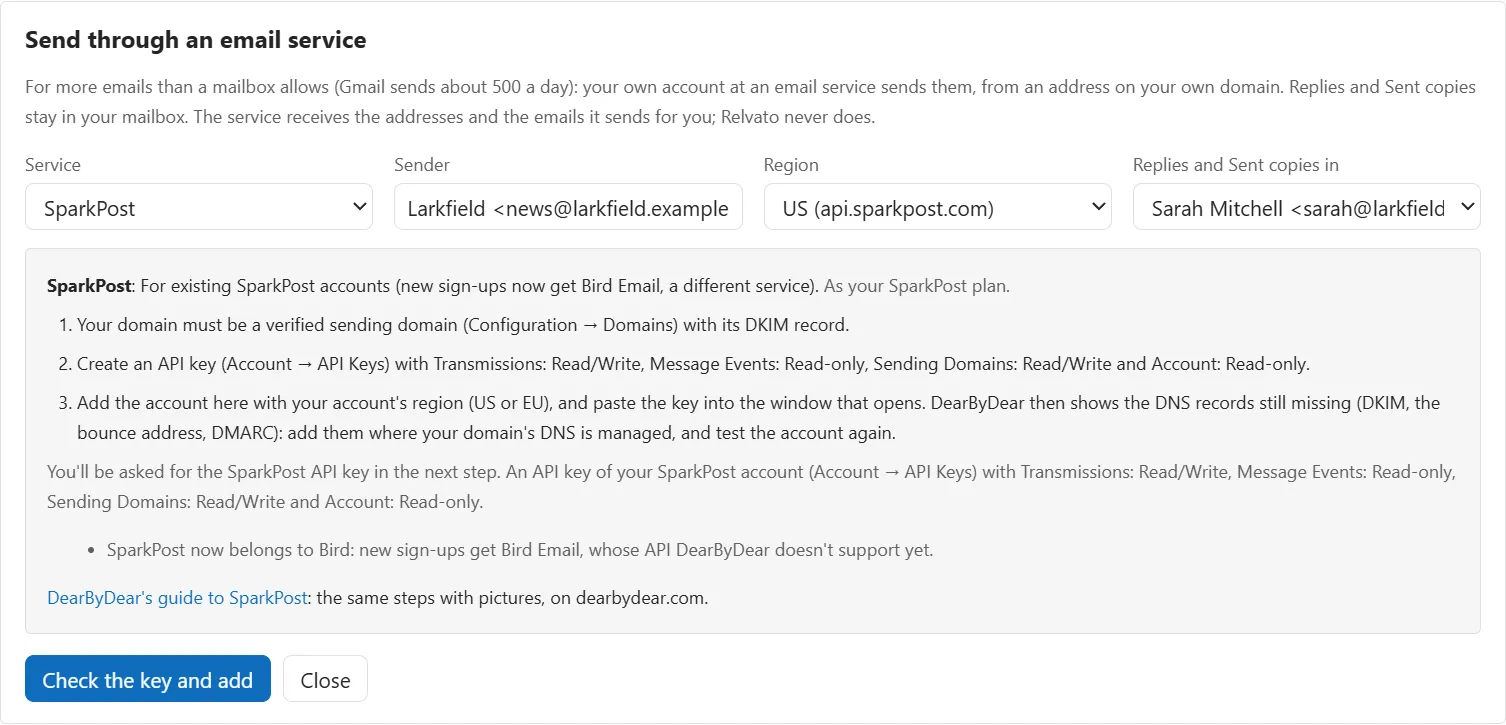
In DearByDear: Accounts → Add a mailbox → Send through an email service, then SparkPost.
Connect SparkPost, step by step
Your domain must be a verified sending domain (Configuration → Domains) with its DKIM record.
Create an API key (Account → API Keys) with Transmissions: Read/Write, Message Events: Read-only, Sending Domains: Read/Write and Account: Read-only.
Add the account in DearByDear with your account's region (US or EU), and paste the key into the window that opens. DearByDear then shows the DNS records still missing (DKIM, the bounce address, DMARC): add them where your domain's DNS is managed, and test the account again.
Good to know
- SparkPost now belongs to Bird: new sign-ups get Bird Email, whose API DearByDear doesn't support.
What DearByDear does with it
| What | With SparkPost |
|---|---|
| How each email goes | The whole email, as DearByDear made it. |
| How replies are matched | By the Message-ID, if SparkPost keeps it; otherwise by the sender and the “Re:” subject, within 60 days. |
| Where bounces and complaints come from | SparkPost’s message events. Hard bounces and complaints go on your Do-Not-Disturb list. |
| Open and click tracking | Off for each email. |
DearByDear’s servers never see your list, your emails or your key: each email goes from your computer straight to your account at SparkPost, and the key stays in Windows’ credential store. SparkPost sends the emails, so it handles each one, under your agreement with it.
Link one of your mailboxes
An email service has no Sent folder or inbox of its own for you. Link one of your mailboxes to the account (Accounts → the account’s actions → Linked mailbox…), and DearByDear puts a copy of each email in its Sent folder, reads the replies there, makes drafts there when you review first, and can tell whether an email interrupted by a crash went out. Without one, replies aren’t tracked, so follow-up emails would also go to people who replied, and there are no drafts to review.
Other email services
Sources
Each provider’s own pages, read on October 25, 2026. If SparkPost’s pages say something different now, theirs is right.