How to send holiday emails to clients
A holiday email to clients, or a Christmas email, works best when it reads like one you wrote to them: their name, a thank-you for the year, sent from your own mailbox rather than as a newsletter. Start from the gallery’s holiday email template, write it once, and schedule the mail merge for the morning it should arrive. Each client gets their own, one by one.
Your client list · the gallery’s Season’s greetings · the day you choose
What you need
Your clients, with a first name for the greeting. A column such as Client Since or City lets a line change from client to client.
| First Name | Last Name | Client Since | |
|---|---|---|---|
| Emily | Carter | emily.carter@example.com | 2019 |
| James | Walker | james.walker@example.com | 2023 |
| Olivia | Bennett | olivia.bennett@example.com | 2026 |
Step by step
- Bring in your clients
New merge, then Who gets it?: a spreadsheet, your Outlook contacts, or the people who emailed you this year.
- Your mailbox, Personal
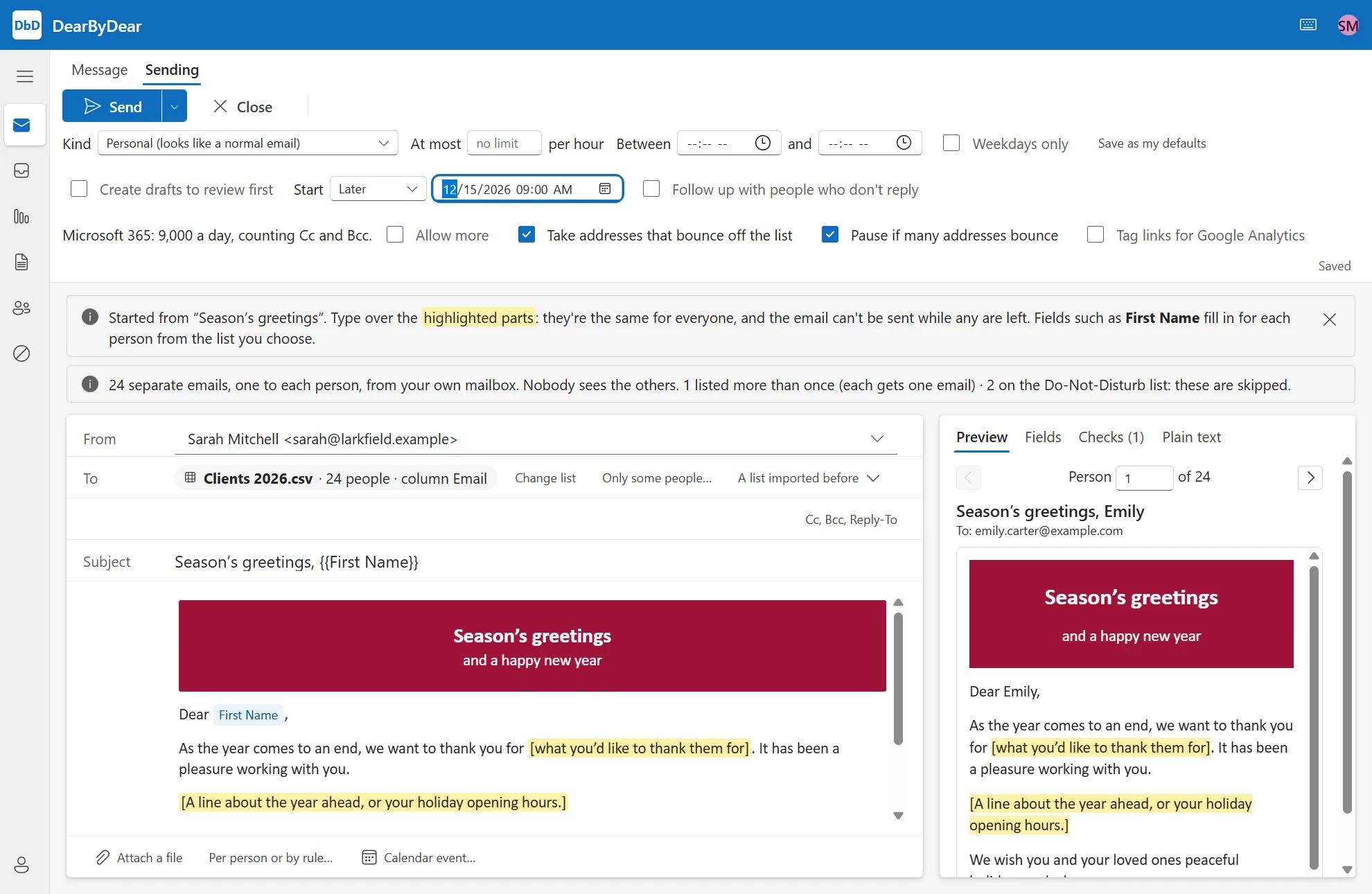
From which account?: the mailbox your clients know. Personal sends it like an email you wrote, with no unsubscribe footer.
- Pick the day
When does it go out?: Later, with a date and time, December 15 at 9:00 AM, say. Sending hours and Weekdays only keep it to office time.
- Start from Season’s greetings
The email: Start from a template…, then Season’s greetings. Type over the highlighted parts once: what you thank them for, a line about next year or your holiday hours, and your name.
- Give some clients a line of their own
If… then… adds a sentence that depends on a column: one for clients who have been with you for years, another for this year’s new ones.
- Check, then schedule
Check and send: Preview each email shows each client’s copy. Confirm, and the merge waits in Merges until its day.
The email
Season’s greetings and a happy new year |
Dear First Name,
As the year comes to an end, we want to thank you for [what you’d like to thank them for]. It has been a pleasure working with you.
[A line about the year ahead, or your holiday opening hours.]
We wish you and your loved ones peaceful holidays and a happy new year.
Warm wishes,
[your name]
First Name from each person’s row in your list · [highlighted] typed once, the same for everyone
Good to know
- Pick a weekday morning before most people’s time off; December email piles up as the holidays get closer.
- Personal emails carry no unsubscribe footer, which suits clients you work with. For a list of people who signed up for news, Campaign adds one.
- DearByDear sends while it’s running: leave it open on the day, or it starts the next time it runs.
- Each email goes on its own, at your mailbox’s pace: the When step shows when the last one will go.
Questions about holiday emails
Should I send a Christmas email or a holiday email?
Whichever suits your clients. “Season’s greetings” and “happy holidays” reach everyone; if you know a client celebrates Christmas, a line of their own can say so.
Can each client get a line of their own?
Yes: If, Then, Else in a mail merge adds a sentence for some clients and another for the rest, by any column of your list.
Can I send it from Outlook or Gmail?
Yes: from Microsoft 365, Outlook.com, Gmail or any mail server. Each email leaves from your address and lands in your Sent folder, like one you wrote.
Does my computer need to be on when it goes?
DearByDear sends while it’s running. If it isn’t at the start time, the merge starts the next time it is, within its sending hours.