Schedule a mail merge
To schedule a mail merge, choose when it starts and how it goes: a start time, a pace such as 30 an hour or 450 a day, sending hours such as 9 AM to 5 PM on weekdays. DearByDear works out when it will finish and keeps within your provider’s limits, spreading a long list over several days. Outlook can hold each email back for up to two hours, and Gmail’s mail merge can’t be scheduled.
Start time · Pace · Sending hours · Weekdays · Free up to 50 people a merge
How it works
- STOP 1Choose when it startsRight away, or Later with a date and time, in the email’s Sending tab. Or Send ▾ → Send later….
- STOP 2Choose its paceAt most so many an hour or a day. It starts from your provider’s limit where DearByDear knows it, such as 450 a day for a free Gmail account, and that limit is kept anyway.
- STOP 3Choose its hoursBetween 9:00 AM and 5:00 PM, say, on weekdays only. Save as my defaults, and the next merge starts with them.
- THENSee when it endsThe check before sending says when it starts and about how long it takes; while it sends: “37 to go · about 25 minutes left · finishes around 03:40 PM”.
A number per day goes one of two ways. Spread evenly over the sending hours, 450 a day between 9:00 AM and 5:00 PM sends one about every 64 seconds. Or as fast as allowed, then the rest wait for the next day. Without sending hours, an even spread covers the whole day.
Where people use it
Write the email on Friday afternoon, check it, and schedule it for Monday at 9:00 AM, when people are at their desks.
Start: Later · Mon 9:00 AMA slower pace for a mailbox that hasn’t sent much before, so the emails go out over the day rather than in one burst.
At most 30 per hourA list longer than a day’s worth for your provider goes out over several days, within its email sending limits. The check before sending says how many days.
Office hours · weekdaysWhile it waits
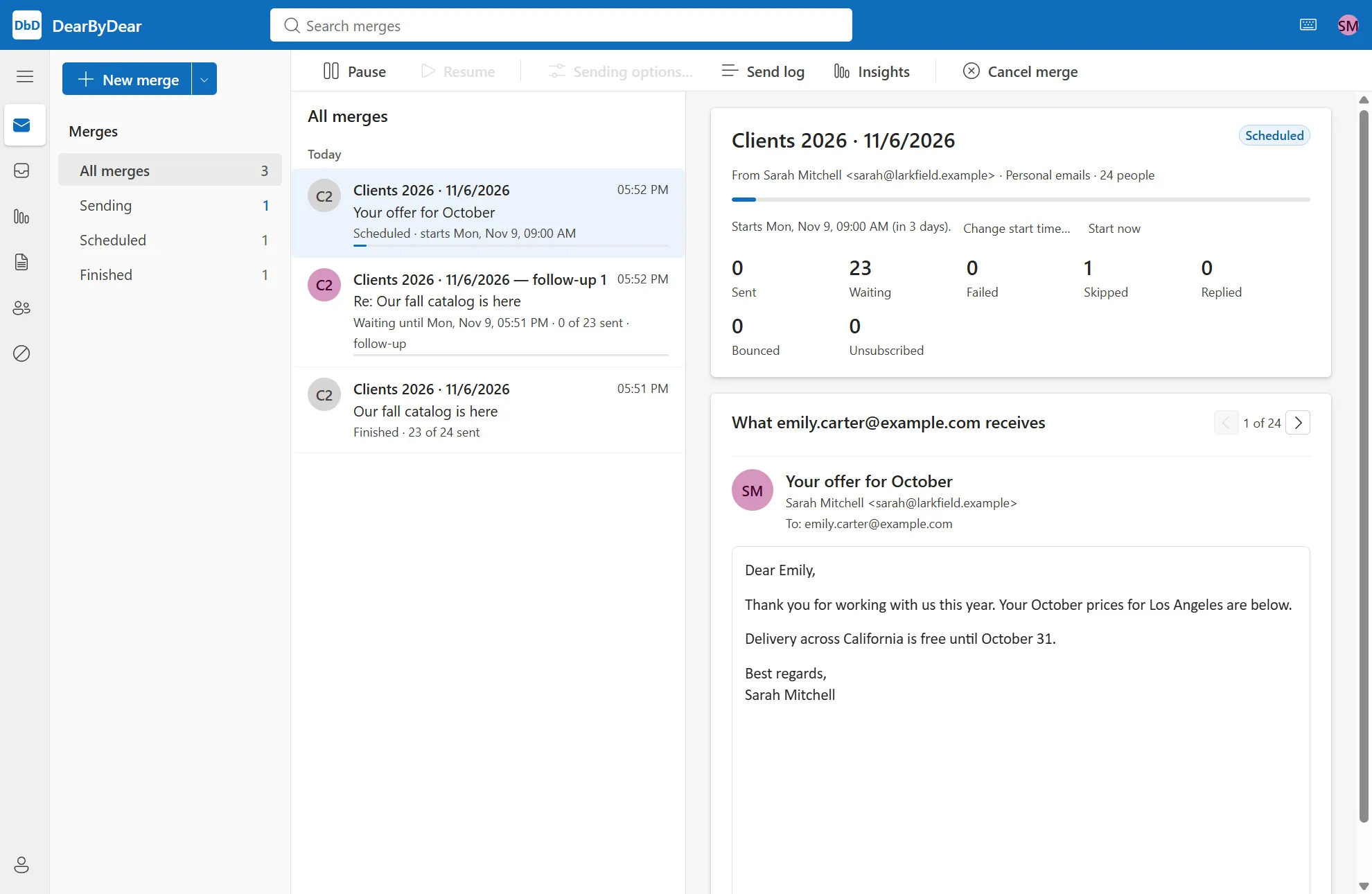
A merge waiting for its sending hours, your limit or your provider’s says “Waiting until …” in Merges, and why, with the time the next email goes. The pace between emails reads Sending. If one stops for another reason, the guide to a mail merge not sending goes through what each line means.
To change its pace, hours or days, pause it, open Sending options…, and resume. A scheduled merge also has Change start time… and Start now.
How to schedule an email in Outlook
- NEW OUTLOOKSchedule sendIn the new Outlook and Outlook on the web, choose the arrow beside Send, then Schedule send, and pick a time. The email waits in Drafts.
- CLASSIC OUTLOOKDo not deliver beforeIn classic Outlook, choose the Message Options arrow in the Tags group (or Options → More commands), tick Do not deliver before, and choose the date and time.
- THENSendClassic Outlook keeps the email in the Outbox until then, and has to be open and online at that time.
Those are Microsoft’s steps, for one email. The new Outlook’s Schedule send doesn’t work for IMAP or POP accounts. To schedule a whole mailing list, each person with their own email, DearByDear’s Start: Later picks the time, as above.
Outlook delays up to two hours. Gmail’s merge can’t wait.
Word’s mail merge hands its emails to classic Outlook, where a rule can defer delivery by a number of minutes, up to 120, and Outlook needs to be online and connected (Microsoft). Gmail’s mail merge can’t be used with schedule send (Google).
| What it does | Word and Outlook | Gmail’s mail merge | DearByDear |
|---|---|---|---|
| Start at a set time | Up to 120 minutes later, by a rule | No | Any date and time |
| Send slowly | — | — | At most so many an hour or a day |
| Sending hours and weekdays | — | — | Yes |
| Says when it will finish | — | — | Before it starts, and while it sends |
It sends from your computer
DearByDear sends while it’s running, or while Claude Desktop with the DearByDear extension is open. A merge whose start time passes while the computer is off starts the next time DearByDear runs, within its sending hours. The same hours hold for its automatic follow-up emails: one due on a Saturday goes on Monday if the merge sends only on weekdays.
Questions about scheduling
Can I schedule a mail merge in Outlook?
Word’s mail merge goes through classic Outlook, where a rule can defer delivery by up to 120 minutes, and Outlook has to be online and connected for it. DearByDear starts at any date and time you choose, from Microsoft 365 or Outlook.com: see mail merge in Outlook.
Can I schedule a mail merge in Gmail?
Not with Gmail’s own mail merge: Google says it can’t be used with schedule send. DearByDear sends from your Gmail account, with an app password, at the time you choose.
Does my computer have to be on?
Yes. DearByDear sends while it’s running, or while Claude Desktop with the DearByDear extension is open. If neither is at the start time, the merge starts the next time one is, within its sending hours.
Can I change the time once it’s scheduled?
Yes: Change start time…, or Start now, on the scheduled merge. Once it’s sending, pause it and open Sending options… to change its pace, hours or days, then resume.
Why does a merge say “Waiting until …”?
It’s waiting for its sending hours, for the limit you set, for your provider’s hourly or daily limit, or, on a follow-up, for the next one to fall due. The merge says which, and when the next email goes.
Is it in the free version?
Yes. The free version has every feature, for merges of up to 50 people.
Sources
Each provider’s own pages, read on October 30, 2026. If they describe these features differently now, theirs is right.