Follow-up emails, sent by themselves
A follow-up email goes by itself, a few days later, to the people who haven’t answered your first one. DearByDear sends it from your own mailbox, in Microsoft 365, Outlook.com, Gmail or any mail server: as a reply to each person’s email, by name, and only to those who haven’t replied, bounced or unsubscribed. You can add a second and a third, each some days after the one before.
Up to three follow-ups a merge · Each some days after the one before · Free up to 50 people a merge
- emily.carter@example.comALREADY REPLIED · SKIPPED
- james.walker@example.comOUT OF OFFICE · GETS IT
- olivia.bennett@example.comNO REPLY · GETS IT
- daniel.price@example.comBOUNCED · SKIPPED
What happens, day by day
- DAY 0The emailEach person gets their own, from your mailbox, at the merge’s pace.
- EVERY 10 MINUTESReplies notedDearByDear reads the inbox of the account it sent from and notes who replied. Automatic replies, such as out of office, don’t count, but one that says when the person is back holds their follow-up until the day after.
- DAY 5The follow-upFive days, or the number you chose, after each person’s own email, at the same time of day, within the merge’s sending hours.
- DAY 9Another, if you add oneFour days, or the number you chose, after the follow-up before it, to those who still haven’t replied. Up to three in all.
- AFTERWhat it addedInsights shows the replies to the email and the replies after the follow-up, side by side.
Each follow-up is made once the email before it has gone to everyone on the merge. On a merge that takes several days to send, at your pace or within your provider’s daily limit, the people it reached first get their follow-up a little later than its days say.
A follow-up timed from each person’s date
A follow-up can go a set number of days before or after a date in each person’s row, instead of after the email before it. Three days before each client’s due date, a reminder goes to those who haven’t replied. Or seven days after it, an overdue notice. It goes at the time of day their email went.
In the Sending tab, choose days before their date in or days after their date in, then the column. The dialog for a second or third follow-up has the same choice. DearByDear suggests one, such as Due Date or Renewal. A date cell from Excel is read as it is. A date typed as text is read in the order the column writes its dates, or as your computer does.
Someone with no date that can be read gets no follow-up. Nor does someone whose follow-up would fall before the day after the email before it, since a “due in 3 days” reminder would be wrong by then. The check before sending says how many, and the send log says why: no date, or date passed.
With three follow-ups, one merge can carry a whole reminder sequence: a nudge 3 days after the email, a reminder the day before each person’s due date, then an overdue notice a week after it. Each goes only to those who still haven’t replied, and anyone marked done gets none.
Who gets the follow-up, and who doesn’t
Everyone whose email went out and who hasn’t replied. An out-of-office reply isn’t an answer, so people who are away get it too: the day after they’re back, when their reply says so. The send log shows it, as in “Out of office, back Nov 23.” A second or third follow-up goes to those who still haven’t replied to any of your emails.
No reply · out of officeAnyone who replied, whose email bounced for good or who unsubscribed, anyone you marked done, and anyone on your Do-Not-Disturb list. A reply to the first email or to any follow-up stops the ones after it. A temporary bounce, such as a full mailbox, doesn’t count. Each person is checked again at the moment their follow-up goes.
replied · done · bounced for good · unsubscribedOnce the first emails have all gone out, the follow-up waits in Merges as a merge of its own. Its send log lists who got it, who was skipped, and why. With more than one, each follow-up merge has its number at the end of its name, and each send log shows when every person’s next follow-up is due.
Your offer for October — follow-up 2Stop the follow-up when they’ve done what you asked
Not everyone answers by writing back. A client pays the invoice, a guest registers, a customer uses the code. Mark them, and their follow-ups stop. Mark who’s done… on the merge reads a file of who did it, such as your accounting program’s export of paid invoices or your shop’s orders. It matches the file to your list by email address, or by a column both share, such as the invoice number. You name the goal, such as Paid or Registered, and the send log gets a tab for it. The file is matched on your computer, and nothing about anyone leaves it.
An email can also ask for an answer with a button. A button such as “Yes, I’ll come” or “Please call me” opens a reply to you with that answer already written, in whatever mail program the person uses. When the reply comes back, DearByDear records the answer and counts it on the merge, and like any reply, it stops the follow-ups. An answer is linked to the merge when it comes from the same address and keeps the “Re:” subject, within 60 days.
Outlook’s Follow Up flag reminds you. It doesn’t send.
Flagging a message you send in Outlook adds a reminder: a to-do item for you, or a flag and a line of text above the From line on the person’s copy (Microsoft). Gmail’s nudges are much the same: sent emails you may need to follow up on appear at the top of your inbox (Google). Either way, you write and send each follow-up yourself, one person at a time.
| What it does | Outlook’s Follow Up flag | Gmail’s nudges | DearByDear |
|---|---|---|---|
| Sends the follow-up for you | No, it reminds you | No, it suggests | Yes |
| Picks out who hasn’t replied | No, you check | Suggests some sent emails | Yes, from your inbox |
| Writes to each person by name | — | — | Yes, with fields from your list |
| Waits for people who are away | — | — | Yes, when their automatic reply says when they’re back |
| Skips bounces, unsubscribes and Do-Not-Disturb | — | — | Yes |
With Easy Mail Merge, follow-ups came from a second add-in, Auto Follow Up. In DearByDear they’re built in, for every mailbox: coming from Easy Mail Merge.
Write the follow-up with the email
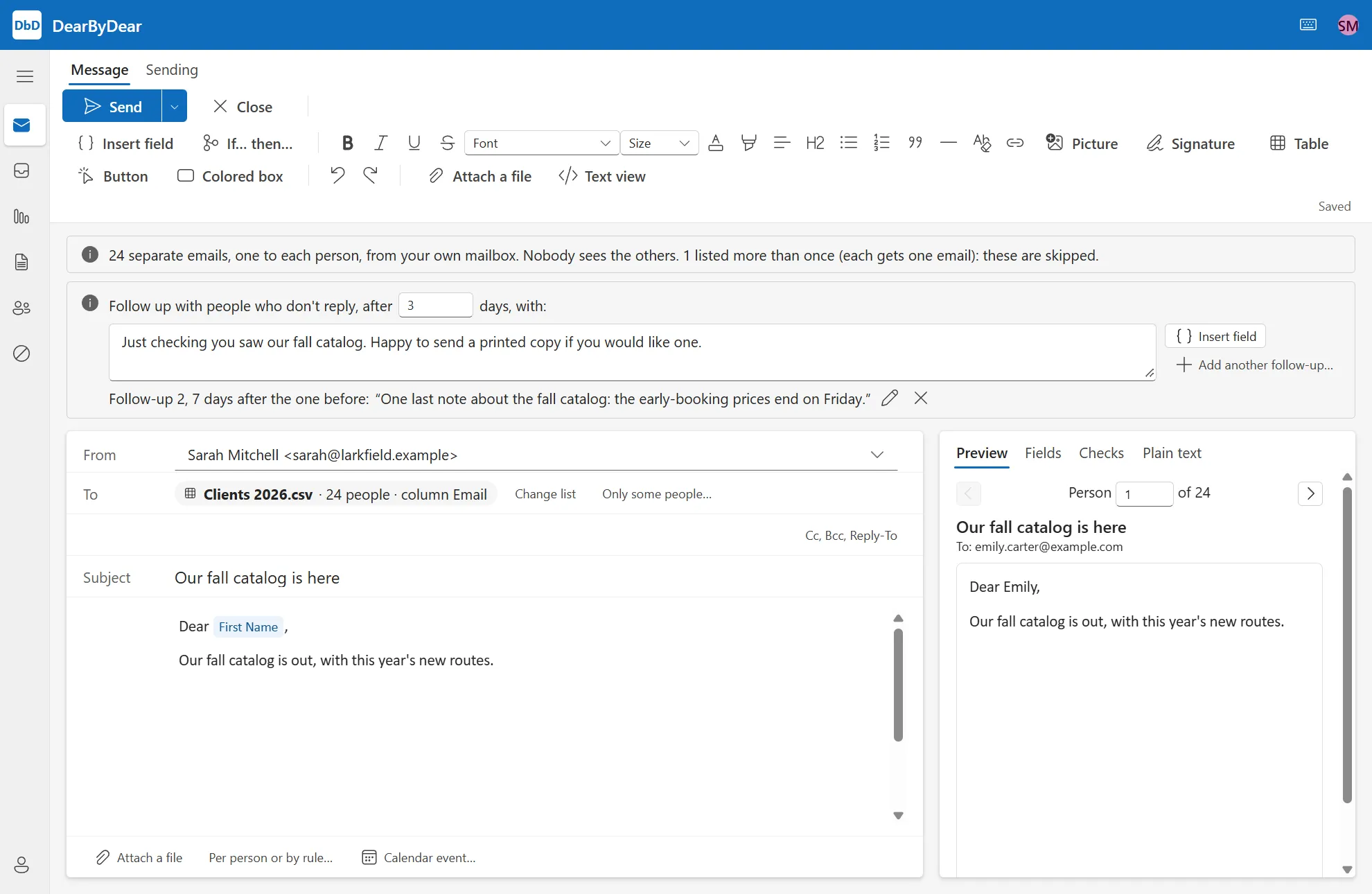
In the email’s Sending tab, tick Follow up with people who don’t reply, choose how many days after the email, or before or after a date in each person’s row, and write its text. In the steps of a new merge, it’s under Afterwards. Insert field puts in a column of your list. Sending options… changes it later, while the merge is paused.
For a second follow-up, choose Add another follow-up…, beside the first one’s text. A short dialog asks when it goes, some days after the follow-up before or before or after a date in each person’s row, and what it says, with wording to start from. Add a third the same way. Each then shows as one line under the first, its days and the start of its text, with buttons to edit or remove it. The check before sending names them all, as in “then another, 4 days after the one before.”
It goes as a reply to each person’s email: Re: before the subject they received, and the headers mail apps use to keep a conversation together. A second or third goes as a reply to the follow-up before it.
Re: Your offer for OctoberFields from your list work in its text, as in the email, so each person’s follow-up starts with their own name.
Dear {{First Name}},It goes to the person alone, with no Cc, Bcc or attachments. If the first email carried a file, the follow-up can point back to it. In a Campaign merge, it keeps the unsubscribe line.
To: the person only9 of the 21 email templates come with a follow-up ready, off until you switch it on, among them the friendly payment reminder, the event invitation and the follow-up after meeting someone.
It sends from your computer
DearByDear sends while it’s running, or while Claude Desktop with the DearByDear extension is open. A follow-up that falls due while the computer is off goes the next time DearByDear runs, within the merge’s sending hours. That’s the other side of DearByDear’s servers never seeing your list or your emails: they can’t send anything for you.
The sending hours apply to the follow-up as to the email. If the merge sends only on weekdays, a follow-up due on a Saturday goes on Monday.
See what the follow-up added
For each merge, Insights counts the people who replied to the email and those who replied after the follow-up. It draws the replies day by day with the follow-up marked, and shows, out of the people who hadn’t replied by then, how many did after it. With more than one follow-up, each person counts once, by their first email, and “after the follow-up” means after the first one reached them. More on mail merge tracking by replies.
Insights → the merge → What the follow-up added
Questions about follow-ups
Can I send more than one follow-up?
Yes, up to three. The first goes a set number of days after each person’s email, and each one after it a set number of days after the one before. Any of them can go before or after a date in each person’s row instead. Each goes only to those who still haven’t replied to any of your emails. Add them with Add another follow-up…, beside the first one’s text.
Can a follow-up go before a due date?
Yes. Time a follow-up from a date in each person’s row, such as 3 days before their due date or renewal date. It goes to those who haven’t replied, at the time of day their email went. Someone whose follow-up would fall before the day after the email before it gets none.
Do out-of-office replies count as answers?
No. DearByDear recognizes automatic replies and notes them apart, so someone who is away still gets the follow-up. If their automatic reply says when they’re back, as in “out of the office until Monday, November 23,” their next follow-up waits until the day after, at the same time of day. A date that reads two ways, such as 3/4, one already past or one more than 120 days off moves nothing. A follow-up timed from a date keeps its time.
What if a rule moves replies out of my inbox?
DearByDear reads the inbox of the account it sent from, every 10 minutes while it’s running. A reply that a rule moves to another folder before then isn’t seen, so that person would get the follow-up too.
Can I change the follow-up after sending?
Yes, while it’s paused. Until the first emails have all gone out, pause the merge and open Sending options… to switch the follow-up on or off, or to change its text and its days. After that, the follow-up waits in Merges as a merge of its own. Pause it, and Sending options… changes its text and days; those still waiting get it that many days after their first email. Or cancel it.
Does it work when I review the emails as drafts first?
Yes. The follow-up isn’t made as a draft: it goes the set number of days after each reviewed draft was sent.
Is it in the free version?
Yes. The free version sends merges of up to 50 people, and their follow-ups go to the same people.
Can Claude set up the follow-up?
Yes, in Claude Desktop with the DearByDear extension: up to three follow-ups when it sets up a merge for you, any of them timed from a date in each person’s row if you ask, and it can change the follow-up while the merge is paused. Claude can also have the days counted Monday to Friday only.
What about an email service account, with DearByDear Pro?
Replies are read from the mailbox linked to it, in Accounts → Linked mailbox…. Without one, replies aren’t tracked, the follow-up goes to everyone whose email didn’t bounce and who didn’t unsubscribe, and the check before sending says so.
Sources
Each provider’s own pages, read on October 30, 2026. If they describe these features differently now, theirs is right.