Mail merge tracking
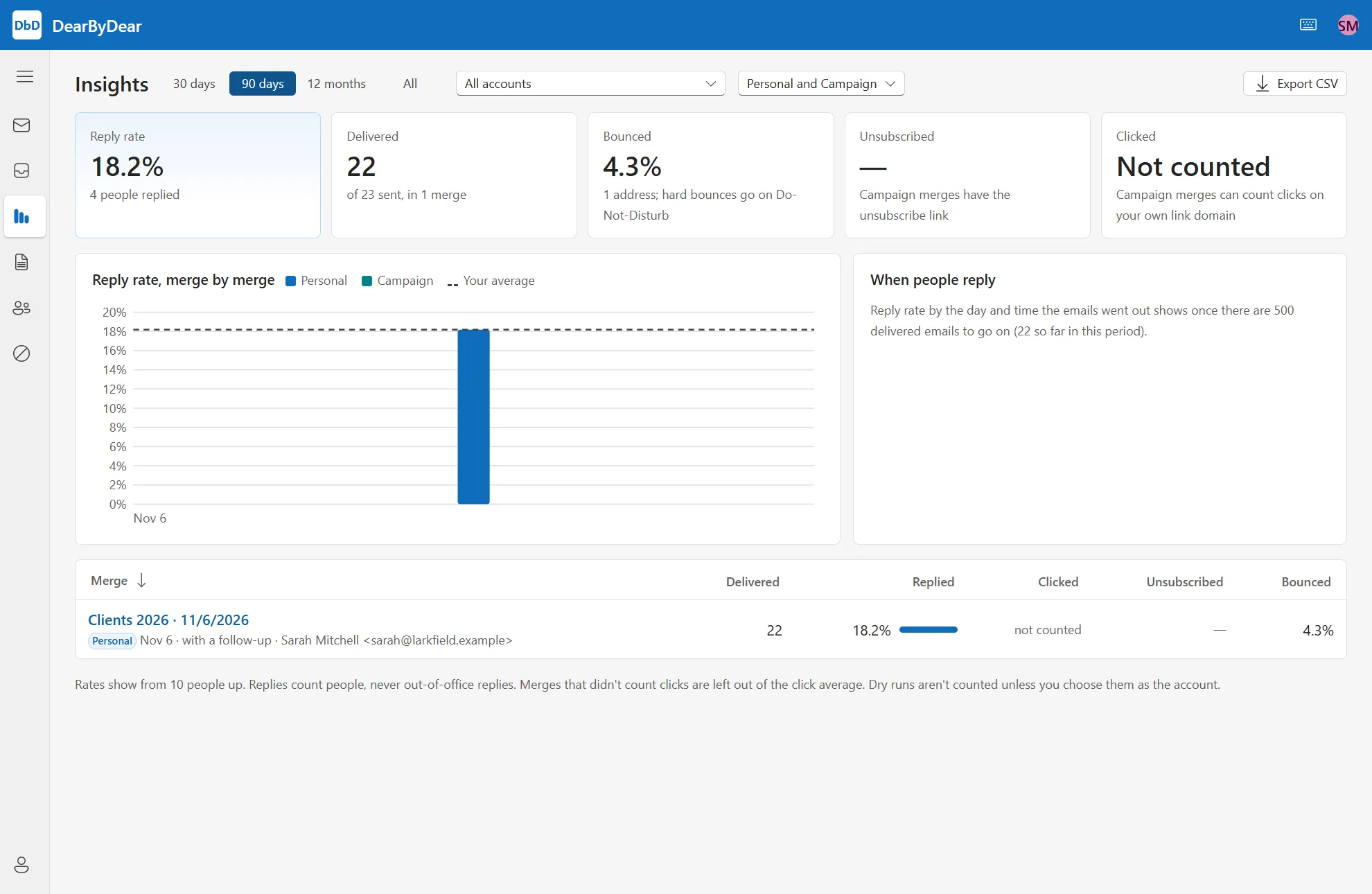
Mail merge tracking in DearByDear counts what a personal email is for: who replied. For 30 days after a merge, it reads what comes back to your mailbox, replies, bounces and requests to stop, from Microsoft 365, Outlook.com, Gmail or any mail server. The Insights window then shows the reply rate merge by merge, how fast people answered, and what the automatic follow-up added. No tracking server sits in between: it all stays on your computer.
Replies · Time to reply · Bounces · Unsubscribes · What the follow-up added · Free up to 50 people a merge
How it works
- STOP 1Sent from your mailboxEach email leaves from your own address, so replies come back to you, as to any email you send.
- STOP 2Read for 30 daysEvery 10 minutes while DearByDear is open, it reads what came back. It never moves or deletes your mail.
- STOP 3Sorted in ResponsesReplies marked, out-of-office notes kept apart, bounced addresses taken off the list, people who asked to stop put on your Do-Not-Disturb list.
- COUNTEDCounted in InsightsReply rate, time to reply, delivered, bounced and unsubscribed, merge by merge and against your own average.
What it counts
The people who replied, each once, against the period before and your own average. A rate shows from 10 people up.
out-of-office replies never countHow long people took to answer, and the replies day by day, with the day the follow-up went marked.
one merge → replies, day by dayOf the people who hadn’t replied when the follow-up went, how many did after it.
one merge → what the follow-up addedAddresses that bounced for good and people who asked to stop, each kept out of your next merge.
the Do-Not-Disturb listFrom 500 delivered emails, the reply rate by the weekday and hour the emails went out. A new merge offers the best time it found.
Insights → When people replyEach number opens the send log with those people, and one merge’s reply rate can be split by a column of your list, such as State.
Export CSVEach person’s results in a Google Sheet or a CRM
To have the results land somewhere else too, tick Post each person’s results to a web address on the Sending tab, or in the steps. Paste the address of a Clay webhook table, or of a Zapier, Make or n8n hook. Each time someone is sent the email, replies, bounces, unsubscribes or is marked done, DearByDear posts that result there, once, as it happens. The hook can write it on to a Google Sheet, a CRM, or the sheet behind mail merge from Google Sheets.
What happened and when, the person’s address, the merge and its subject, and whether it was the first email or a follow-up. A bounce says why, and a reply made with a reply button says which answer. With their columns from the list adds the person’s row.
One post per result, as JSONSend a test posts a made-up result and says whether the address answered. A post that doesn’t get through is tried again for about a day.
Send a testThe merge says where its results go and how they went: “Results go to hooks.zapier.com: 12 posted, 1 failed”. Stop posting results ends it, for its follow-ups too.
Stop posting resultsFollow-ups post to the same address, and so do the merges Keep sending makes for people who join the list later. For a merge already sent, Claude, or ChatGPT’s Codex in the ChatGPT desktop app, can add the address.
The posts go straight from your computer to the address you paste, while DearByDear or Claude Desktop with the DearByDear extension is running, never through DearByDear’s servers. The address has to start with https, unless the hook runs on your own computer, as n8n can. It’s off unless you turn it on, and it’s in the free version.
Why it counts replies, not opens
Most mail merge tracking counts opens, with a tiny image in each email, and clicks, by sending every link through a counting address. In an email meant to look personal, both work against you: junk-mail filters read them as signs of bulk mail. Open counts are unreliable too, since Apple Mail loads images for the reader and many mail apps block them. A reply is a person answering you, and that is what DearByDear counts.
Outlook can ask for a read receipt, email by email, but the reader can decline to send one, there is no way to force it, and it isn’t available for IMAP accounts such as Gmail (Microsoft).
| After sending | Word and Outlook mail merge | DearByDear |
|---|---|---|
| Who replied | Your inbox, read by hand | Marked and counted, merge by merge |
| Out-of-office notes | Mixed in with the replies | Kept apart |
| Bounces | In your inbox | Taken off the list |
| A follow-up to those who didn’t reply | — | Yes, and what it added |
Questions about tracking
How do I track replies to a mail merge in Outlook?
Send it from DearByDear with your Microsoft 365 or Outlook.com mailbox. DearByDear reads the replies that come back to that mailbox, marks who replied, and counts them merge by merge. Word and Outlook’s own mail merge leave the replies in your inbox, uncounted.
Does it work with Gmail?
Yes. DearByDear reads a Gmail or Google Workspace inbox the same way, through the app password it was connected with, and counts the replies to every merge sent from it.
Does it track opens and clicks?
Not in a personal email. Counting opens adds an image to every email and counting clicks rewrites every link, which junk-mail filters read as signs of bulk mail, and open counts are unreliable anyway. DearByDear counts replies.
Do out-of-office replies count?
No. They are kept apart in the Responses window, and Insights counts only people who replied.
Does DearByDear need to be open?
To read what comes back, yes: it checks your mailbox every 10 minutes while it’s open, for 30 days after a merge sends. Replies that came in while it was closed are read the next time.
Is anything sent to a tracking server?
No. DearByDear reads your mailbox from your computer and keeps the counts there. Its servers never see your mailing list or your actual emails: they stay private on your computer, encrypted. Results go anywhere else only if you turn on Post each person’s results to a web address, and then only to the address you paste.
Can I get the results in a Google Sheet or a CRM?
Yes. Tick Post each person’s results to a web address on the Sending tab and paste the address of a Clay webhook table, or of a Zapier, Make or n8n hook. Each result is posted there as it happens, and the hook can write it on to a Google Sheet or a CRM. It’s in the free version.
Is it in the free version?
Yes. The free version has every feature, Insights included, for merges of up to 50 people.
Sources
Each provider’s own pages, read on October 31, 2026. If it describes Outlook differently now, theirs is right.