Responses
Responses, Ctrl+2, gathers what came back from your merges: replies, out-of-office notes, bounces and unsubscribes, each with the email that person was sent. DearByDear reads them from the mailbox each merge went out from, and asks you about the few it can’t decide.
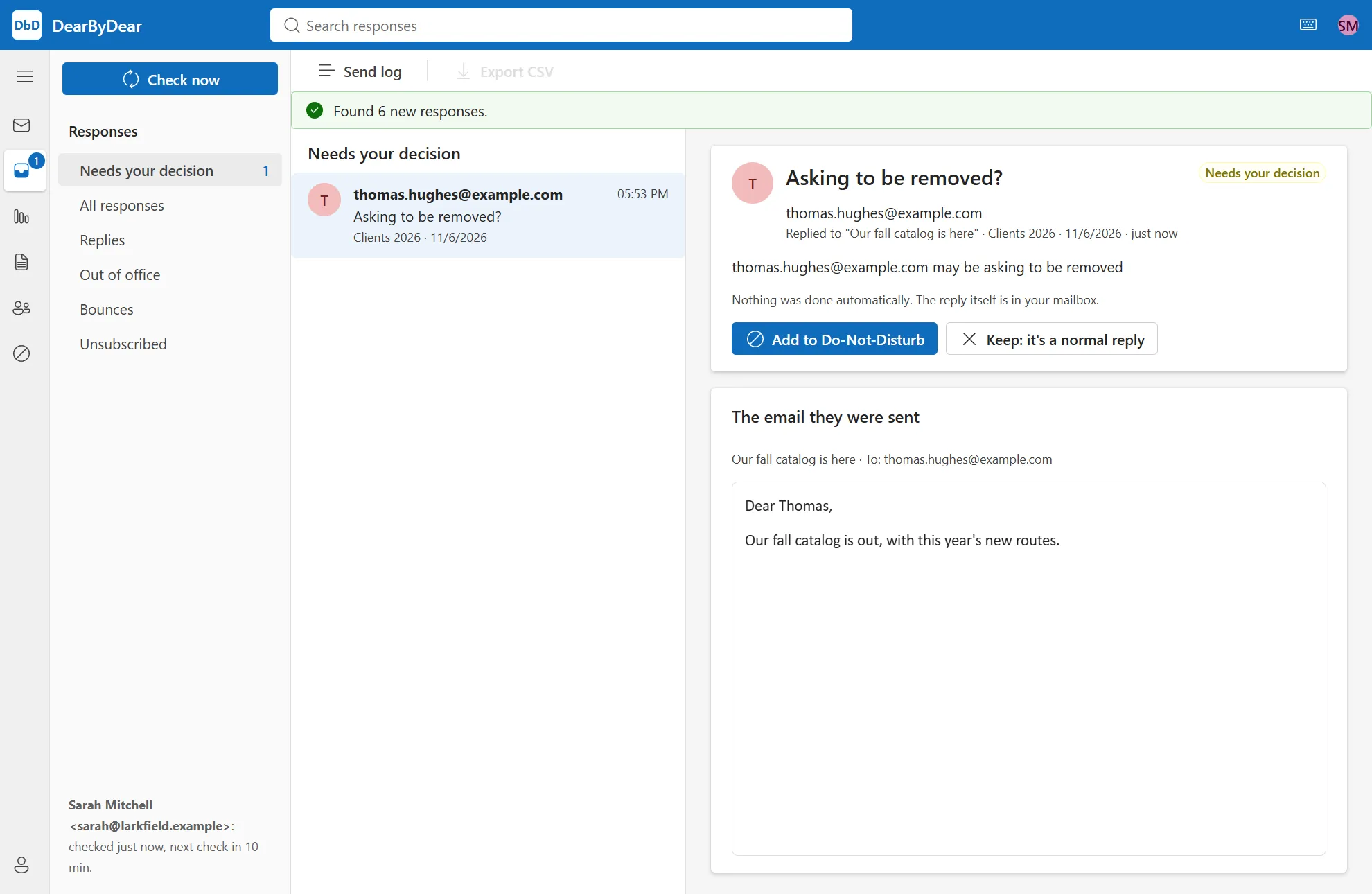
What you see
- Check now
Reads the inboxes now, as F9 does. Otherwise each inbox a merge went out from is read every 10 minutes, for 30 days after it sends.
- Folders
Needs your decision, while something waits for you; then All responses, Replies, Out of office, Bounces and Unsubscribed.
- Inbox checking
Each inbox, when it was read and when it will be next: “checked 3 min ago, next check in 7 min.” If one can’t be read, it says why.
- The responses
Each one with who sent it, its subject, what kind it is and which merge it answers, newest first.
- The decision
A reply that may ask to be removed, or a report that may be a bounce, waits for you: Add to Do-Not-Disturb, or Keep: it’s a normal reply. “Nothing was done automatically.”
- The email they were sent
What that person got from the merge, to read their reply against.
What you can do here
What happens when someone replies?
The reply stays in your mailbox; DearByDear notes that it came, so a follow-up, if the merge has one, skips this person. It shows here and in the send log, under Afterwards.
What happens to a bounce?
An address that doesn’t exist goes on the Do-Not-Disturb list, so no merge emails it again, and comes off the mailing list the merge was made from. A temporary bounce, such as a full mailbox, is tried again in later merges; after three within 90 days, it goes on the list too. A refusal because of the sending domain, a block list or the email’s content doesn’t count against the address: the person is marked not delivered, and can be sent to again once the cause is fixed.
Why doesn’t an out-of-office reply count?
It’s automatic, not the person: a follow-up, if the merge has one, still goes to them, and Insights doesn’t count it as a reply.
What if someone asks to be removed?
A reply saying “unsubscribe” or “remove me” waits under Needs your decision as “Asking to be removed?”. Add to Do-Not-Disturb, or Keep it if it isn’t that. The link in a Campaign email’s footer is applied by itself: see the unsubscribe link in a mail merge.
Good to know
- DearByDear only reads: it never moves or deletes your mail. From Microsoft 365 and Outlook.com, it reads the Inbox folder.
- Inboxes are read while DearByDear runs, or Claude Desktop with the DearByDear extension.
- Export CSV saves the responses in the folder shown; Send log opens the log of the merge a response answers.