Add an unsubscribe link to a mail merge
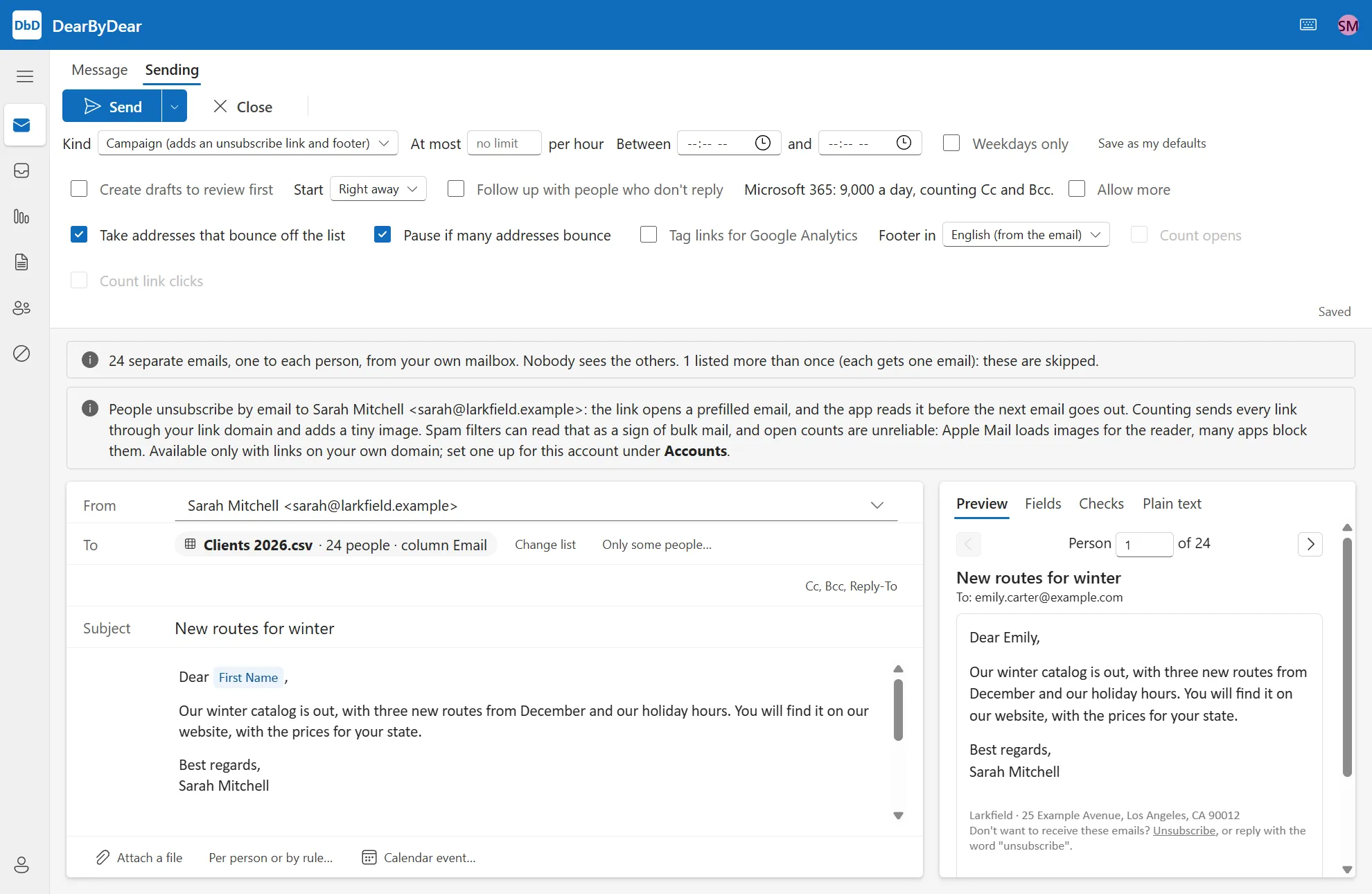
To add an unsubscribe link to a mail merge in DearByDear, send it as a Campaign. Each email gets a footer with your business name, your postal address and an Unsubscribe link. The link opens an email to your own address, already written; when it arrives, that person goes on your Do-Not-Disturb list, and your inbox is read before every batch, so nobody who asked gets another email. Personal, the default, looks like an ordinary email, with no footer.
Footer · Postal address · Unsubscribe by email · Do-Not-Disturb · Free up to 50 people a merge
How it works
- STOP 1Choose CampaignIn the email’s Sending tab: Campaign, which adds an unsubscribe link and footer. Or in a new merge’s steps.
- STOP 2Add your sender detailsYour business name and postal address, once for each account. A Campaign without an address is flagged before it goes.
- STOP 3Check the footerIn the email’s language, told from its text or chosen: English, Spanish, French, German, Italian, Romanian, Chinese (Simplified) or Hindi.
- THENUnsubscribes, before each batchYour inbox is read before every batch, and anyone who unsubscribed is skipped from then on.
Two ways to unsubscribe
It opens a new email to you, with a code in the subject that says which merge and which person, never their address in plain text. When it arrives, it’s applied by itself.
Subject: Unsubscribe 7KQ…Someone who replies “unsubscribe” or “remove me” is flagged in Responses for you to decide: Add to Do-Not-Disturb, or Keep.
Asking to be removed?Every merge skips the addresses on it. People who unsubscribe and addresses that bounce are added by themselves; you can add others.
Skipped by every mergeNo server stands between you and your clients: the unsubscribe email comes to your own mailbox, and the list it updates is on your computer.
What the rules ask, and what Gmail does
For commercial email, the FTC’s guide asks for your valid physical postal address, a return email address or another easy way to opt out that works for at least 30 days after you send, and opt-outs honored within 10 business days (FTC). Gmail’s own mail merge adds a unique unsubscribe link to the bottom of each email (Google). DearByDear applies an unsubscribe before the merge’s next batch; it isn’t legal advice, and your email’s content is yours to judge.
Questions about unsubscribing
Does my mail merge need an unsubscribe link?
If its main purpose is to advertise or promote a product or service, the US CAN-SPAM Act asks for a clear way to opt out and your valid postal address, and asks you to honor an opt-out within 10 business days. Whether an email is commercial is the law’s question, not DearByDear’s: Campaign adds both, Personal adds neither.
Does Gmail’s mail merge add an unsubscribe link?
Yes: Google adds a unique unsubscribe link to the bottom of each email, and its mail merge needs a paid Google Workspace plan. DearByDear sends a mail merge from Gmail, free Gmail included, and adds the link only when you choose Campaign.
What happens when someone unsubscribes?
Their address goes on your Do-Not-Disturb list, and no merge emails it again, Personal or Campaign. Insights counts the unsubscribes merge by merge.
Can a Personal merge go to a large list?
Yes. For more than 500 people, Check and send suggests Campaign, with its unsubscribe link and footer, and says Personal stays right for people who expect your email, such as your own staff or clients you work with. It’s a warning, not a stop.
What if someone just replies “unsubscribe”?
The reply waits in Responses, under Needs your decision, as “Asking to be removed?”: you choose Add to Do-Not-Disturb, or Keep if it’s a normal reply. Only the link’s own email is applied by itself, because a reply can quote anything.
Does my computer have to be on?
Unsubscribes are read while DearByDear runs, or Claude Desktop with the DearByDear extension, and always before a Campaign’s next batch. If the inbox can’t be read, the batch waits and tries again; after three failures in a row the merge pauses and says why.
Is it in the free version?
Yes. The free version has every feature, for merges of up to 50 people.
Sources
Each provider’s own pages, read on October 30, 2026. If they say something different now, theirs is right.