Send log
The send log lists everyone on a merge, one row each: whether their email went, and if not, why; what came back from them; and when their follow-up is due. It’s where you send the failed ones again, or export the whole log.
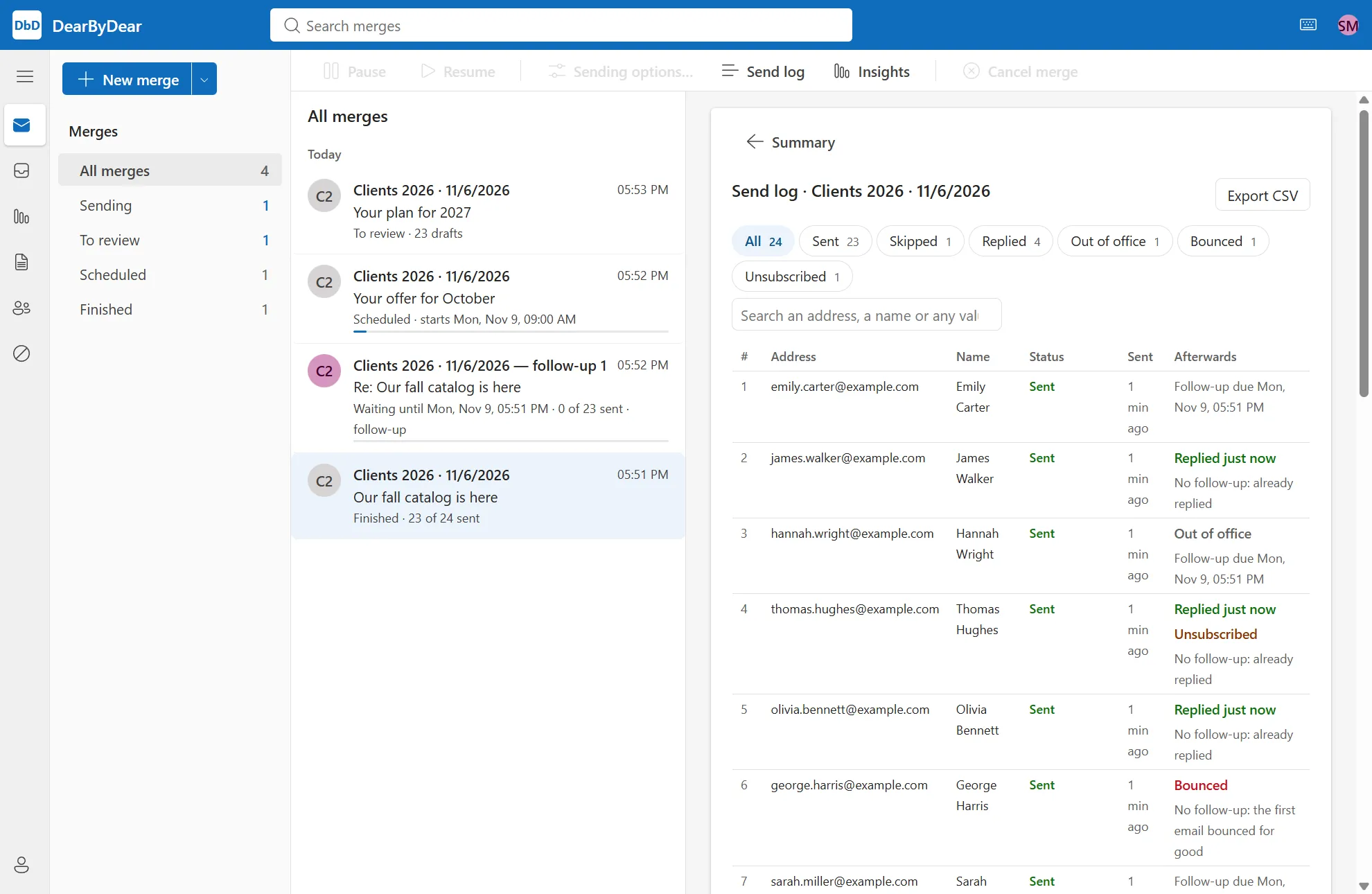
What you see
- Show
All, Sent, Waiting, Failed, Skipped, Replied, Out of office, Bounced, Unsubscribed, each with how many. Only those with someone in them are shown.
- Search
An address, a name, or any value from the list.
- Export CSV
The log as a CSV file, as it’s shown: filtered and searched.
- Status
Sent, Waiting, Sending, Failed, Skipped, or “Draft, to review”, with why under it: the reason someone was skipped, the mail server’s error, or when a follow-up is due.
- Afterwards
What came back: Replied, Out of office, Bounced, Unsubscribed; and the follow-up: “Follow-up due …”, “Follow-up sent …”, or “No follow-up” and why.
- Summary
Back to the merge’s numbers and each person’s email.
What you can do here
How do I see who replied?
Choose Replied under Show. Each person’s row says when, under Afterwards. Out-of-office replies have a tab of their own and don’t count as replies.
How do I send the failed ones again?
Send 2 failed again, say, above the log. A new merge is made with the same email, account and sending settings, and people who replied in the meantime are left out.
What does “Follow-up due” mean?
When that person’s follow-up goes, if they haven’t replied by then. Once it’s gone it reads “Follow-up sent”; someone who replied reads “No follow-up: already replied.” More on automatic follow-up emails.
How do I send to the people still waiting for a license?
Send the rest. The free version sends a merge to 50 people and the rest wait in it; with a license, Send the rest makes a new merge for them. The License panel is where you buy or enter one.
Good to know
- It opens from Send log in the Merges window’s toolbar, inside the reading pane, and from Insights and Responses as a page of its own, with Back.
- It refreshes every few seconds while the merge is sending.
- A merge sent only to some of its list lists the people it left out too, as “not chosen by the merge’s condition.”
- Send logs keep people’s details for as long as the privacy settings say; after that, a finished merge keeps only its counts.