Privacy settings
The Privacy panel, in Settings, is where your data is looked after. Your lists, emails and send logs are stored encrypted on this computer. Here you choose how long send logs keep people’s details, forget a person who asks, and back everything up to a file only your password opens.
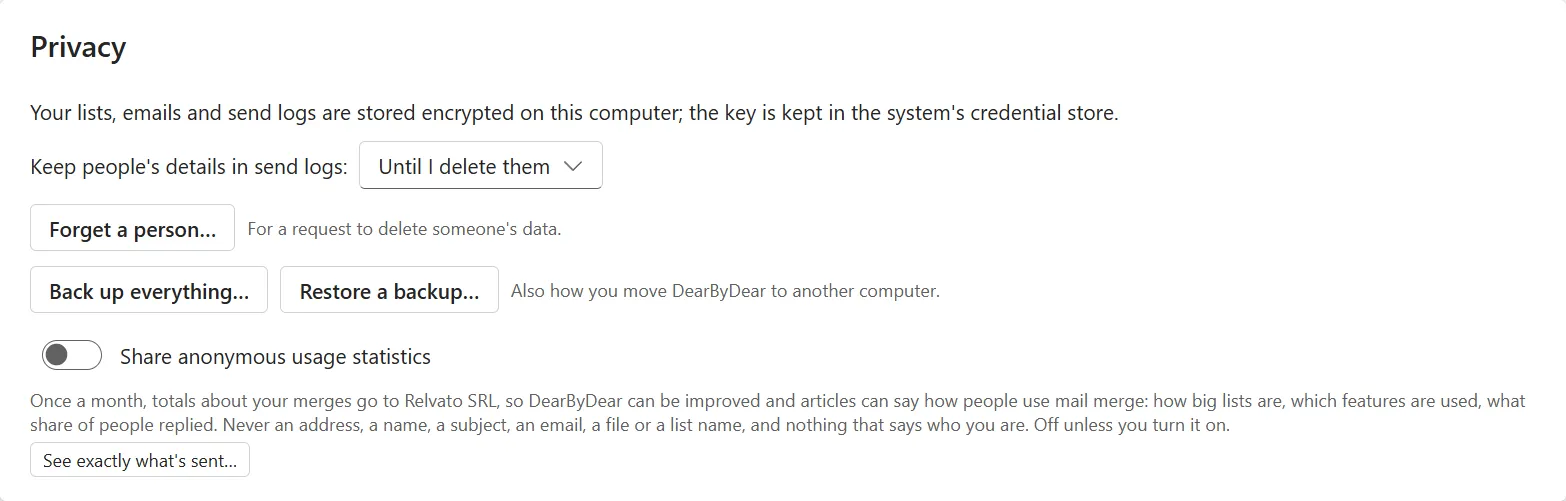
What you see
- Encryption
“Your lists, emails and send logs are stored encrypted on this computer; the key is kept in the system’s credential store.”
- Send-log retention
Keep people’s details in send logs: until you delete them, or for 6, 12, 24 or 36 months. After that, a finished merge keeps only its counts.
- Forget a person…
For a request to delete someone’s data: they go from every list, merge and send log.
- Back up everything…
Everything in one file, locked with a password of at least 8 characters.
- Restore a backup…
A backup brought back, after its password. Also how you move DearByDear to another computer.
- Usage statistics
Share anonymous usage statistics: off unless you turn it on. Once a month the app sends Relvato totals about your merges, never an address, a name, a subject or a file name. See exactly what’s sent… shows the next report as it would go; the privacy policy says the rest.
What you can do here
How do I delete someone’s data when they ask?
Forget a person…, their email address, then Forget them. Keep the address on the Do-Not-Disturb list, so they’re never emailed again, is ticked unless you untick it. A list’s right-click menu has Forget this person… too. How Relvato handles data is in DearByDear’s privacy policy.
How do I move DearByDear to a new computer?
On the old one, Back up everything…, a password, then Choose where to save…. On the new one, after installing, Restore a backup…, the file and the password; then close DearByDear and open it again to finish. The license doesn’t come with the backup: enter your license key on the new computer.
How long are people’s details kept?
Until you delete them, unless you choose 6, 12, 24 or 36 months. DearByDear asks first: merges that finished longer ago lose the people’s details, “now and from then on. Their counts stay. This can’t be undone.”
What if I forget the backup’s password?
Then the backup can’t be opened: “The password is wrong, or the backup file is damaged.” Keep the password somewhere safe when you make the backup.
Good to know
- DearByDear’s servers never see your mailing list or your actual emails: they stay private on your computer, encrypted.
- The panel is in Settings, not with the mailboxes in Accounts: choose Settings…, just below Accounts…, in the menu under your picture in the title bar.