Merges
Merges is DearByDear’s main window, Ctrl+1. Every merge you’ve made is listed by folder, with what it’s doing now: sending, waiting and until when, scheduled, finished. Select one to see its numbers and each person’s email, and to pause, resume or cancel it.
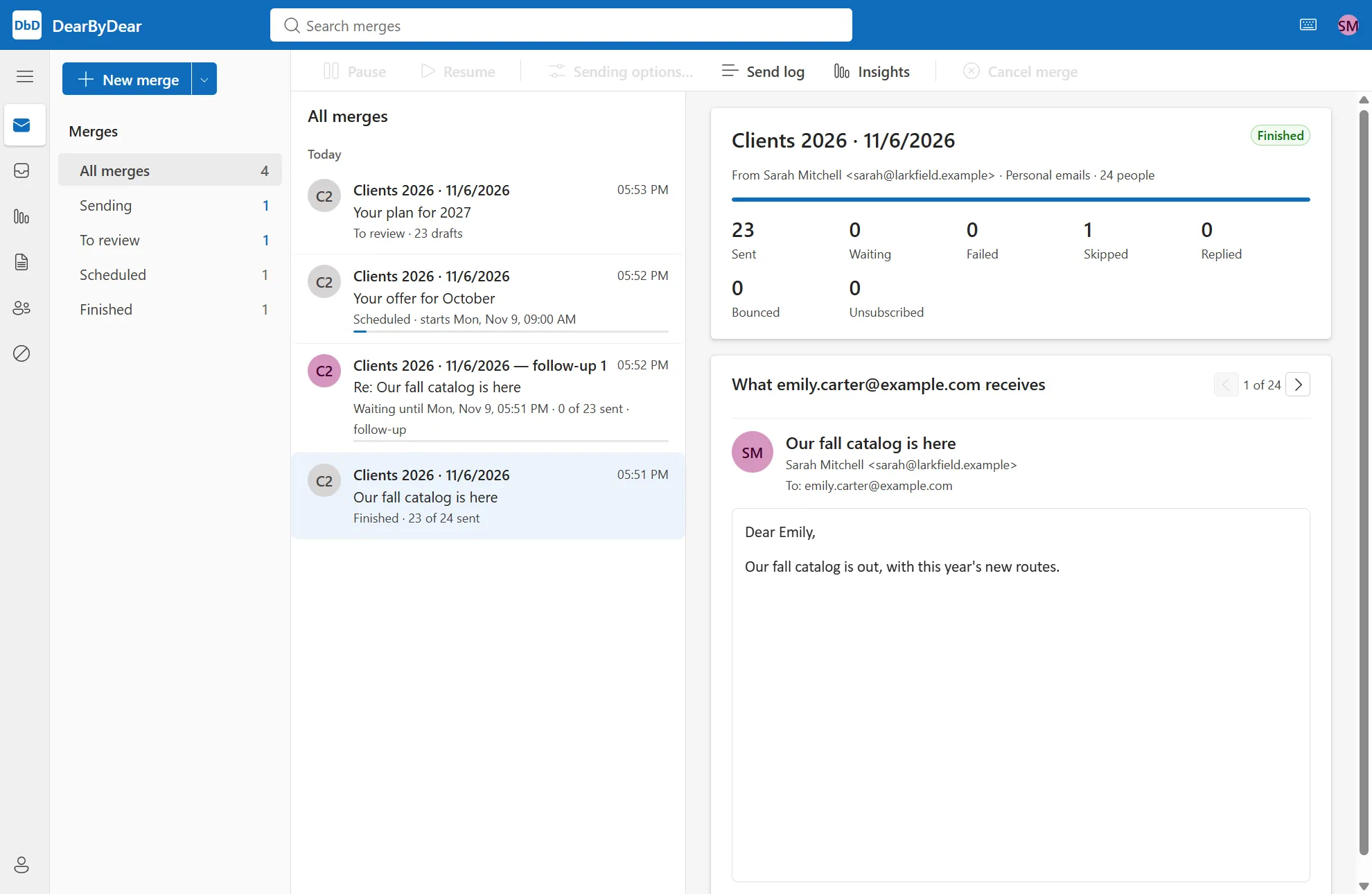
What you see
- New merge
Starts one, with the steps or straight with the email. Its menu has the other starts: a template, a draft from your mailbox, an email file.
- Folders
All merges, Sending, To review, Scheduled, Paused, Drafts, Finished and Canceled, each with its count. An empty folder is hidden, but for All merges, Sending and Finished. Drafts and All merges start with the merges you haven’t finished setting up, under Unfinished.
- The toolbar
Pause, Resume, Sending options…, Send log, Insights and Cancel merge, for the merge selected.
- Your merges
Each merge with its subject and what it’s doing: “Scheduled · starts …”, “Waiting until … · 12 of 40 sent”, “Finished · 23 of 24 sent”.
- The merge
Who it’s from, Personal or Campaign, how many people, and its numbers: Sent, Waiting, Failed, Skipped, Replied, Bounced and Unsubscribed.
- What each person receives
Each person’s email as it was sent, with Previous person and Next person.
What you can do here
How do I pause or stop a merge?
Pause, in the toolbar; Resume carries on where it stopped. Cancel merge asks first, because unsent emails will never be sent. Delete in the list does the same, and asks too.
What does “Waiting until …” mean?
The merge is waiting for its sending hours, for the limit you set, for your provider’s hourly or daily limit, or for a follow-up to fall due, and it says which, with the time the next email goes. While it sends, it says how long is left: “37 to go · about 25 minutes left · finishes around 03:40 PM”. To set those hours, schedule the mail merge.
How do I change when a scheduled merge starts?
Select it, then Change start time… or Start now, beside its start time. To change its pace, hours or follow-up once it’s sending, Pause it first, then Sending options….
Where are drafts to review?
In the To review folder. The merge says “23 drafts are waiting for you,” with Send the reviewed drafts, which sends them as they are now in your mailbox: see mail merge to drafts.
How do I stop sending to people who join the list later?
A merge made with Keep sending says “Ongoing: people who join Clients 2026 get it too” on each of its merges, with how many merges it has made so far and who is waiting and why. Stop sending to new people asks first, and the merges already made carry on. Start again asks too, then sends it now to everyone on the list who hasn’t had it yet, and to whoever joins later.
How do I start a merge?
New merge, or Ctrl+N, opens the steps of a new merge: who gets it, from which account, when, the email, and the check.
Good to know
- A merge sends while DearByDear runs, or Claude Desktop with the DearByDear extension, and carries on by itself when either opens again.
- A merge that can’t reach the mail server isn’t marked failed: it waits, says why, and carries on by itself once it gets through.
- The newest merge is selected until you pick another; ↑, ↓, Home and End move through the list.
- A merge sent only to some of its list shows its condition in the reading pane, after the list’s name.
- Each merge made for the people new on a list is named after the first, with “new people” and the day: “Your offer for October — new people, Nov 21”. Canceling the first merge, or deleting its list, stops sending to new people.
- A merge that posts each person’s results to a web address says where they go and how they went: “Results go to hooks.zapier.com: 12 posted, 1 failed”. Stop posting results asks first, and stops its follow-ups’ posts too.