Mail merge with If, Then, Else
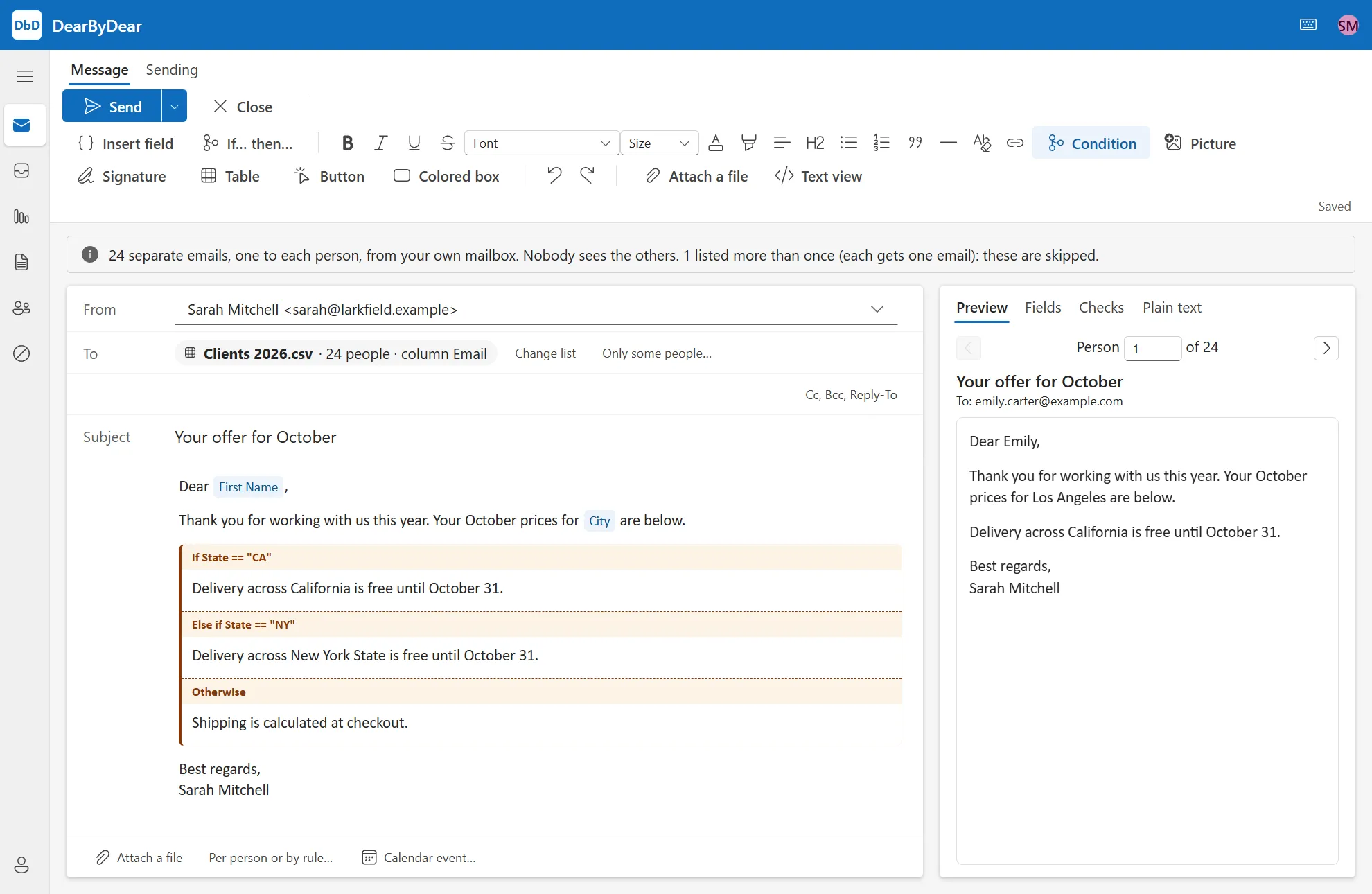
An If, Then, Else rule shows different text to different people in the same mail merge: one sentence for clients in California, another for New York, a third for everyone else. In Word it’s a field with two outcomes. In DearByDear you write each version right in the email, under its label, as many as you need, and a check across your list shows who gets which.
If · Else if · Otherwise · Checked across your list · Free up to 50 people a merge
How it works
- STOP 1Put the cursor where it changesThen If… then… on the ribbon. Or select text you already wrote: it becomes the If version.
- STOP 2Choose the column and the valueIs, is not, contains, starts with, is greater than, is empty, and more, against any column of your list.
- STOP 3Write each versionUnder If, then Else if (the Condition menu adds one) and Otherwise. Each can hold paragraphs, a picture, a table or a button, and fields.
- CHECKEDSee who gets whichThe Checks tab counts the people each version reaches across the whole list, and flags a version nobody gets: a typo in the value?
Where people use it
Free delivery in one state, different shipping terms in another, the usual ones for everyone else, in one email to the whole list.
If State is CA · Else if NY · OtherwiseA line about the volume discount only for orders over a thousand dollars, compared as numbers, whatever the spreadsheet’s formatting.
If Amount is greater than 1000“For Carter Design” only where the list has a company, and nothing, not even a blank line, where it hasn’t.
If Company is not emptyWord gives you two outcomes. Your list may need more.
In Word, Mailings → Rules → If…Then…Else takes a field, a comparison and a value, then the text to insert and the text to insert otherwise (Microsoft). Behind it is an IF field with six comparisons, from equal to less than or equal (Microsoft). A third version means nesting IF fields in the field codes by hand.
| What it does | Word’s If…Then…Else | DearByDear |
|---|---|---|
| Where you write it | In a dialog’s text boxes, or the field codes | In the email, under each version’s label |
| Versions | Two: the text, and otherwise | As many as you need: If, Else if, Otherwise |
| Comparisons | Six, from equal to less than or equal | Those, plus contains, starts with, ends with, is empty |
| What a version holds | The text typed in the box | Paragraphs, pictures, a table, a button, fields |
| Checked across the list | — | Who gets each version, and one nobody gets |
Rules read the list as Excel shows it, so “greater than 1000” works on a cell that reads $1,234.50: one of the things a mail merge from Excel no longer loses on the way through Word.
Questions about If, Then, Else
Can I use If, Then, Else in an Outlook mail merge?
With Word’s mail merge, yes: Mailings → Rules → If…Then…Else gives one condition and two outcomes. For more than two, Word’s IF fields are edited by hand. DearByDear sends from Microsoft 365 or Outlook.com without Word, with as many versions as you need: see mail merge in Outlook.
How do I skip a line when a field is blank?
Put the line under a rule such as “Company is not empty”, with no Otherwise. For people whose cell is empty, the rule shows nothing, and the paragraph goes with it: no blank line is left in their email.
Can a rule compare numbers or dates?
Yes. “Amount is greater than 1000” compares the number, even when Excel shows the cell as $1,234.50, and a date compares as a date. From a CSV file, where every value is text, before and after compare dates written as 2026-12-01, and more and less than compare numbers; the check before sending warns about a value that isn’t one. An equal-to test with a value in quotes compares as text, so 00399 keeps its zeros.
Can the subject line change by rule too?
Yes. A rule works in every part of the email, the subject included, written there as text: {{#if State == "CA"}}Free delivery in California{{else}}Your October prices{{/if}}.
Can a rule decide which file is attached?
Yes, with the same conditions: “if State is CA, attach the California price list”. Every rule that matches a person adds its files, as in a mail merge with attachments.
Is it in the free version?
Yes. The free version has every feature, for merges of up to 50 people.
Sources
Each provider’s own pages, read on October 30, 2026. If they describe Word differently now, theirs is right.