Check SPF, DKIM and DMARC
To check SPF, DKIM and DMARC for your domain, you look up three records in its DNS: SPF names the servers that may send for it, DKIM holds the key that checks each email’s signature, and DMARC tells mailboxes what to do with email that fails. Gmail and Yahoo ask every sender for SPF or DKIM, and bulk senders for all three. Email from a domain without them can come back as Gmail’s 550 5.7.26 error. In DearByDear, Is the domain ready to send? looks up all three for the address you send from, and says what to add.
SPF · DKIM · DMARC · Only the domain name looked up · Free up to 50 people a merge
DMARC check: look up a domain
Type a domain, or an email address at it. The check finds which provider handles its mail, then looks up its SPF, DKIM and DMARC records and says what’s missing.
Your browser asks Cloudflare’s public DNS (1.1.1.1) for the domain’s public records. Nothing is sent to DearByDear.
What SPF, DKIM and DMARC do
Names who may send for the domain: one TXT record at the domain itself, listing your mailbox provider and every service that sends as you.
v=spf1 include:spf.protection.outlook.com -allSigns each email. Your mail provider adds the signature as it sends, and the key to check it sits in DNS under a name the provider picks, its selector: selector1 and selector2 for Microsoft 365, google for Google Workspace.
google._domainkey.larkfield.exampleTells mailboxes what to do with email that fails: take no action (p=none), treat it as suspect (quarantine), or refuse it (reject). It passes when SPF or DKIM passes for the domain in the From address.
_dmarc.larkfield.example · v=DMARC1; p=none;What Gmail, Yahoo and Outlook.com require
| Mailbox | Every sender | Bulk senders | Email that fails |
|---|---|---|---|
| Gmail, since February 1, 2024 | SPF or DKIM | Close to 5,000 a day or more: SPF, DKIM and DMARC (p=none is enough), with the From domain aligned with SPF or DKIM | May be put in junk or refused with 5.7.26; enforcement ramping up from November 2025 |
| Yahoo and AOL, since February 2024 | SPF or DKIM | No number given: SPF, DKIM and DMARC (p=none or more), with the From domain aligned | Refused when it fails the domain’s DMARC or DKIM policy, as 554 5.7.9 |
| Outlook.com, Hotmail and Live | Not required; Microsoft says every sender benefits | Over 5,000 a day: SPF and DKIM passing, DMARC of p=none or more, aligned with SPF or DKIM | Refused with 550 5.7.515 since May 5, 2025 |
These rules are for personal addresses at Gmail, Yahoo, AOL and Outlook.com, and the counts are your domain’s, not one merge’s: everything sent as the domain counts, from every mailbox and every service. A small merge from a domain that also sends invoices or newsletters can cross them, and then each Hotmail or Outlook.com address on the list meets Outlook.com’s 550 5.7.515 refusal. Below the counts, Gmail and Yahoo still ask for SPF or DKIM.
How to check SPF, DKIM and DMARC
- STOP 1SPFIn Windows’ Command Prompt, list the domain’s TXT records: SPF is the one beginning v=spf1.
nslookup -type=txt larkfield.example - STOP 2DMARCThe same lookup, with _dmarc. before the domain: the record begins v=DMARC1, and p= is its policy.
nslookup -type=txt _dmarc.larkfield.example - STOP 3DKIM, by its selectorA DKIM key is found only by its name, so put your provider’s selector and _domainkey before the domain: google for Google Workspace, selector1 for Microsoft 365.
nslookup -type=txt google._domainkey.larkfield.example - RESULTSAn email’s resultsSend an email to a Gmail address of yours and open it on a computer: the Down arrow below the sender’s name shows Mailed by and Signed by when it was authenticated. In any mail app, the Authentication-Results header shows spf=pass and dkim=pass.
The records say what your domain publishes. Only an email’s results say whether it passed, and whether the domain that passed is the one in From, as DMARC asks.
What to add when one is missing
Add one TXT record at the domain naming your mailbox provider: include:spf.protection.outlook.com for Microsoft 365, include:_spf.google.com for Google Workspace. If a record is there without your provider, add its include before ~all or -all: a domain keeps a single SPF record.
v=spf1 include:_spf.google.com ~allTurn on DKIM in your mail provider’s admin settings, which gives the DNS records to add. Google asks for a key of 1024 bits or more, and recommends 2048 where your provider supports it.
selector1 and selector2 for Microsoft 365Add a TXT record at _dmarc before the domain. Google and Yahoo accept p=none to start, and Microsoft advises moving on to quarantine and reject gradually, once everything sending as you passes.
v=DMARC1; p=none;Changes to DNS can take a few hours to show, so look again later before sending.
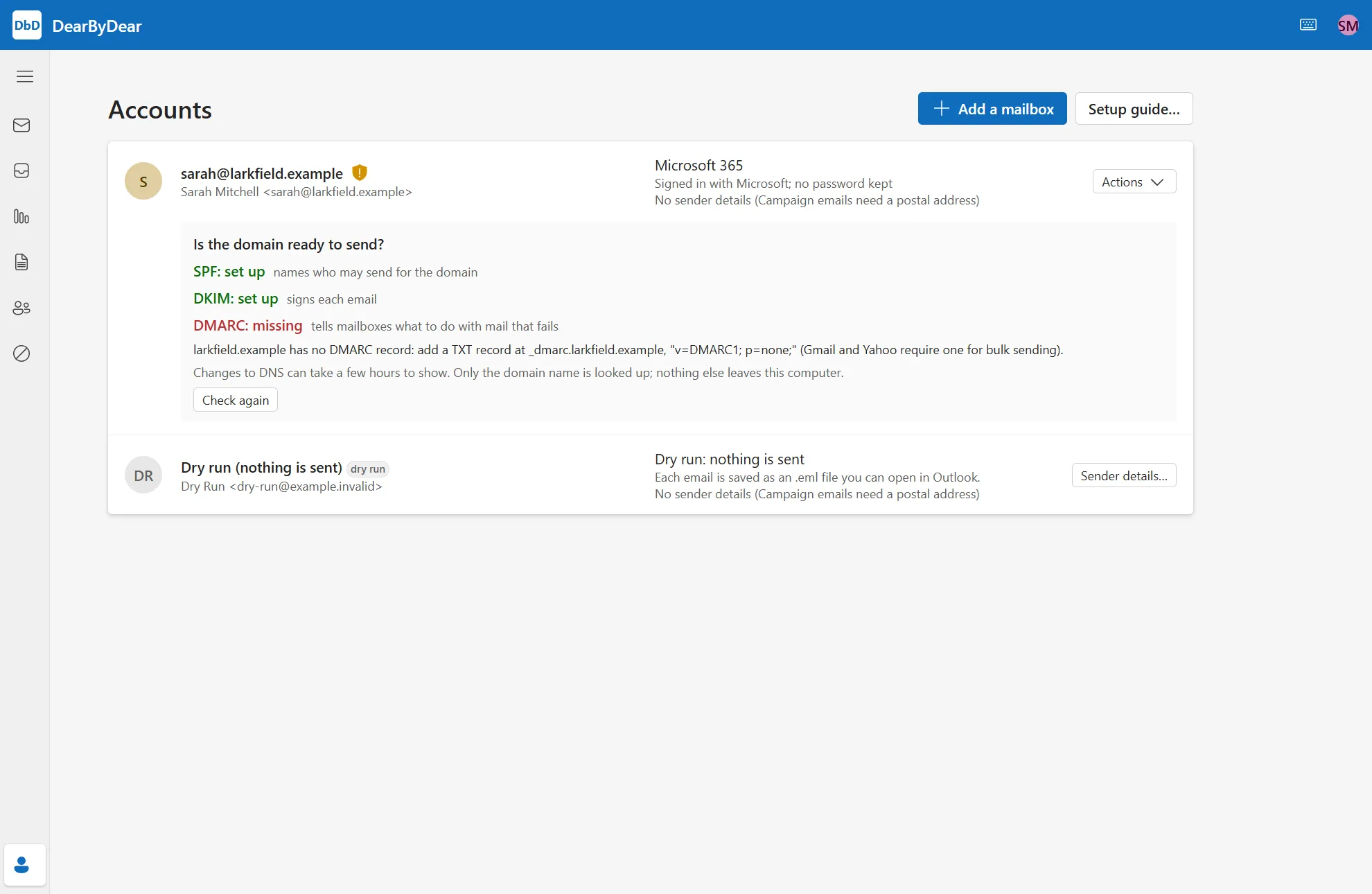
Is the domain ready to send?
- STOP 1AccountsEach mailbox has an icon for its domain: green when it’s ready, amber with something to fix, gray when it couldn’t tell. Click it, or choose Is the domain ready to send? among the mailbox’s Actions.
- STOP 2Three linesSPF, DKIM and DMARC, each set up, missing or couldn’t tell, with DMARC’s policy and what to add for each one to fix.
- STOP 3Check and sendBefore a merge goes, the check warns from the last result, which is looked up again when it’s a day old.
- PAUSEDRefused three timesIf three of a merge’s emails are refused on the sending side while it sends, it pauses. When the domain is the cause, it points you to the domain check.
What the domain check shows
Set up when the domain has a v=spf1 record. For Microsoft 365, Google Workspace and Zoho Mail, it must name that provider, directly or through one include; otherwise the line reads “doesn’t name your mailbox provider,” with the include to add.
SPF: set upSet up when a key is at your provider’s selectors: selector1 and selector2 for Microsoft 365, google for Google Workspace, zmail or zoho for Zoho Mail. For another mail server it tries common names, and says “couldn’t tell” when none has a key.
DKIM: couldn’t tellSet up when _dmarc has a record, with its policy beside it, such as policy: quarantine. Missing, it gives the record to add, “v=DMARC1; p=none;”, as Gmail and Yahoo require one for bulk sending.
DMARC: missingWith nothing missing, the panel says the domain “is ready: Gmail, Yahoo and Outlook.com find what they look for.” For a Gmail, Outlook.com, Yahoo or iCloud address, it says the domain is your mailbox provider’s own, which takes care of all three.
Check againBeside each address on Accounts: green when all three are set up or the domain is your provider’s own, amber with something to fix, named as you point to it, and gray when it couldn’t tell or hasn’t checked yet. Opening Accounts reuses a check from the last day, or looks the domain up again.
green · amber · grayCheck and send names what’s missing: SPF or DKIM always, DMARC for Campaign merges and merges of 500 people or more. It begins: “larkfield.example isn’t fully set up for sending, so Gmail, Yahoo and Outlook.com may refuse these emails or put them in junk.”
Check and sendIn Claude Desktop with the DearByDear extension, Claude can run the same check for a mailbox and tell you what to add. It only reads: nothing is changed.
reads onlyRecords, not results
The domain check reads the records your domain publishes, not the emails you send. It can’t tell whether a given email passed, whether the domain SPF or DKIM confirmed is the one in From, or how Gmail, Yahoo and Outlook.com rate your domain and its servers, block lists included. A DKIM key under a name it doesn’t try shows as couldn’t tell. So “ready” means nothing is missing from the records, not that every email will be accepted.
An email’s own results, above, say the rest, and so do the bounces. DearByDear reads them from your mailbox while it, or Claude Desktop with its extension, is running, and counts a refusal for the sending domain against the domain, not the person: they’re marked not delivered, and their address stays on your mailing list.
Questions about SPF, DKIM and DMARC
How do I check SPF, DKIM and DMARC for a domain?
Look up its TXT records: the domain itself for SPF, _dmarc before it for DMARC, and for DKIM, your mail provider’s selector with _domainkey before the domain. Then send yourself an email and read its results: Gmail shows Mailed by and Signed by, and the Authentication-Results header shows spf=pass and dkim=pass.
Do I need DMARC for a small mail merge?
Gmail and Yahoo require DMARC of bulk senders, close to 5,000 emails a day for Gmail, counting everything your domain sends. Every sender needs SPF or DKIM. A record of p=none, which tells mailboxes to take no action, is enough for both, and it’s the one DearByDear suggests.
I send from a Gmail or Outlook.com address. Is there anything to set up?
No. Google and Microsoft set up their own domains. DearByDear’s check says so: “gmail.com is your mailbox provider’s own domain: it takes care of SPF, DKIM and DMARC.”
Why does DMARC fail when SPF passes?
Because SPF can pass for another domain, such as the one a sending service uses for bounces, and DMARC asks that the domain SPF or DKIM confirms be the one in your From address. The page on 550 5.7.509 DMARC verification errors explains it, with the fix.
Does an email service sending as my domain need these records too?
Yes. Microsoft says a domain needs them even when another company sends for it: add the service to your SPF record and turn on its DKIM signing with your domain. With DearByDear Pro and Amazon SES, Postmark or another email service, DearByDear lists, for most services, the records your domain still lacks.
Does DearByDear send my domain or my list anywhere to check it?
It looks up the domain name in DNS from your computer, as any lookup does, and nothing else. DearByDear’s servers never see your mailing list or your actual emails: they stay private on your computer, encrypted.
Is it in the free version?
Yes. The free version has every feature, the domain check included, for merges of up to 50 people.
Sources
Each provider’s own pages, read on November 5, 2026. If they describe their rules differently now, theirs are right.