Attachments
The Attachments window decides which files go with each person’s email: the same file for everyone, a file named for each person, or files by rule. It counts, across your list, who has every file and who is missing one, and says how large the largest email will be.
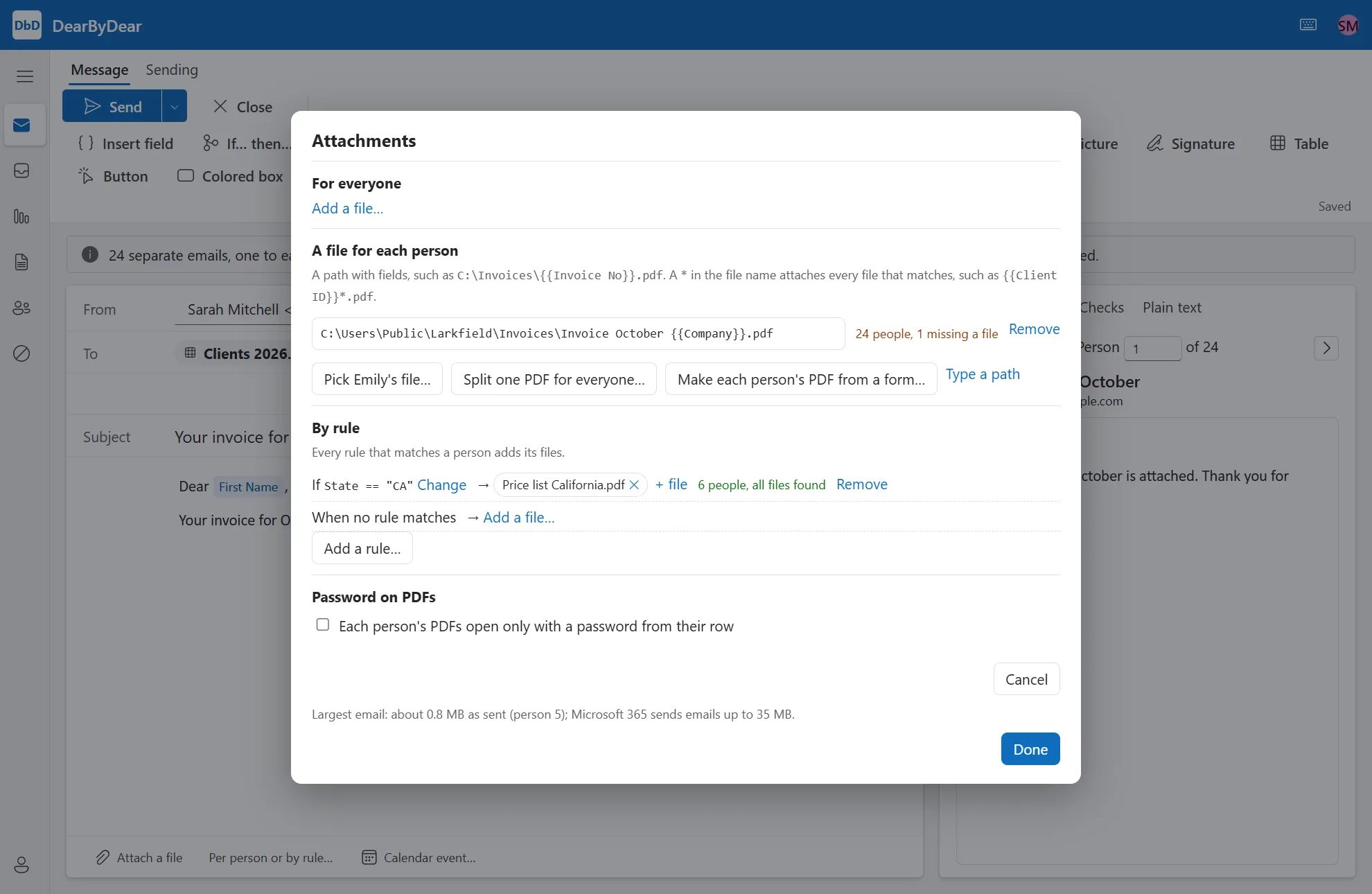
What you see
- For everyone
Files every email carries, each marked found or not found. Add a file… adds another.
- A file for each person
A path with fields, such as C:\Invoices\{{Invoice No}}.pdf, so each person gets the file named with their details. A * in the name attaches every file that matches. Or Paths from a column…: the column of your list that holds each person’s files as full paths, one or several with ; between them. The line under it counts the people, and those missing a file.
- By rule
Files for some people only, such as the California price list when State is CA. Every rule that matches a person adds its files, and When no rule matches holds the files for everyone else.
- The largest email
The largest email as it will be sent, whose it is, and how large your provider sends. Anyone whose email is over that is skipped, and the note says what to do.
What you can do here
How do I attach each person’s own file?
Under A file for each person, Type a path with a field in the file name, such as C:\Invoices\Invoice October {{Company}}.pdf. Or choose Pick Emily’s file… and pick hers: DearByDear finds which of her values is in the file’s name and makes the path. The line below says how it went: “23 people, all files found.” If your list has a column with each person’s full path, such as C:\Invoices\Emily Carter.pdf, choose Paths from a column… instead: the column is chosen for you, and you can choose another. More on this in mail merge with attachments.
How do I attach a file for some people only?
Add a rule…, choose the column and the value, such as State is CA, then Next: the files. A person who matches several rules gets the files of each.
What if someone’s file is missing?
The line counts them: “23 people, 1 missing a file.” Under the email, “22 / 23 found, 1 missing ▸” lists them by person. The Check and send window lists them again before anything goes: put the files in place, or skip those people. With a column of paths, someone whose cell is empty isn’t missing a file: their email goes without one, and the line counts them too.
What if an email is too large?
The note names the people and the provider’s size, and suggests what works: zip the files, make the PDFs smaller, or share a link instead. Each provider’s size is in the email size limits guide.
Good to know
- It opens from Per person or by rule…, under the email. Attach a file, beside it, adds a file for everyone without opening the window.
- The counts need a list: before you choose who gets the email, the window says “Choose who gets the email (the To line) to see who gets which files.”
- Done keeps the changes in the email; Cancel leaves it as it was. Attachments written in a way the window can’t show as rules stay under Written by hand, and go as written.