Check and send
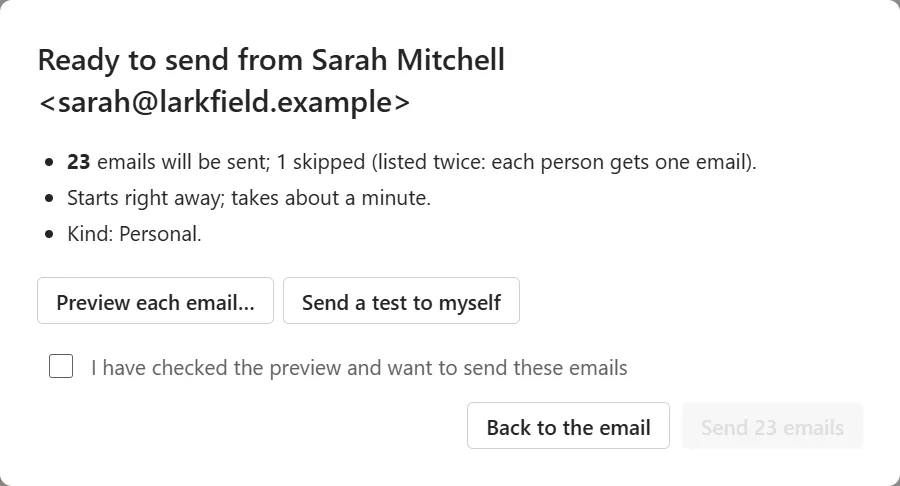
Check and send opens when you choose Send, and nothing goes until you’ve read it. It says how many people get the email and who is skipped, when it starts and what kind of email it is, lets you see every email and send yourself a test, and waits for you to tick that you’ve checked.
What you see
- The summary
How many get the email, and who is skipped and why: listed twice, on the Do-Not-Disturb list, or at a domain that can’t receive email. Then when it starts and about how long it takes, the kind of email, and the follow-ups, if there are any, each with its days.
- Preview each email…
Everyone on the list, each marked “gets the email” or why not, and each person’s email as it will be sent, with its plain-text version and its size.
- Send a test to myself
The first person’s email, as they would get it, sent to the address the merge goes from, with [TEST] before its subject.
- The confirmation
“I have checked the preview and want to send these emails.” The send button stays off until it’s ticked.
- Send
Sends the merge, and says how many emails: Send 23 emails. For drafts to review it reads Make 23 drafts; for the dry run, Start dry run.
What you can do here
How do I see who is skipped, and why?
The summary counts them by reason. For names, open Preview each email… and choose Who is skipped under Show: each person has their reason beside them, such as “on the Do-Not-Disturb list” or “listed twice: gets the email once, from the first row.”
How do I send myself a test?
Send a test to myself. The first person’s email goes to the address the merge sends from, with [TEST] before the subject, and the result shows beside the button: “Sent a test email to …”. To preview a mail merge before sending, person by person, use Preview each email… as well.
What if some people have problems?
The check lists them by row, up to ten, with what’s wrong: an address that isn’t one, a field with no value, a file not found, an email too large to send. Fix the list and check again, or tick Skip them and send the rest. A too-large email is measured against your provider’s email sending limits.
Why does it say only 50 people get it?
The free version sends a merge to 50 people: the first 50 get it now, and the rest wait in the merge. With a license, Send the rest sends them later; or choose Enter a key… in the check, and all of them go. The prices are on DearByDear pricing.
How do I go back and change the email?
Back to the email. Nothing is sent, and the check is made again the next time you choose Send.
Good to know
- It opens from the email’s Send button, Ctrl+Enter or Alt+S, and from the last step of a new merge. Every merge passes through it.
- For drafts to review, the title reads “Drafts to review, from …” and nothing is sent until you choose Send the reviewed drafts on the merge. For the dry run, it reads “Dry run: nothing will be sent.”
- A Campaign without a postal address gets a warning here, with Add sender details… beside it.
- A merge that goes only to some of its list says how many it leaves out, and the condition that chose the rest.