Mail merge filter
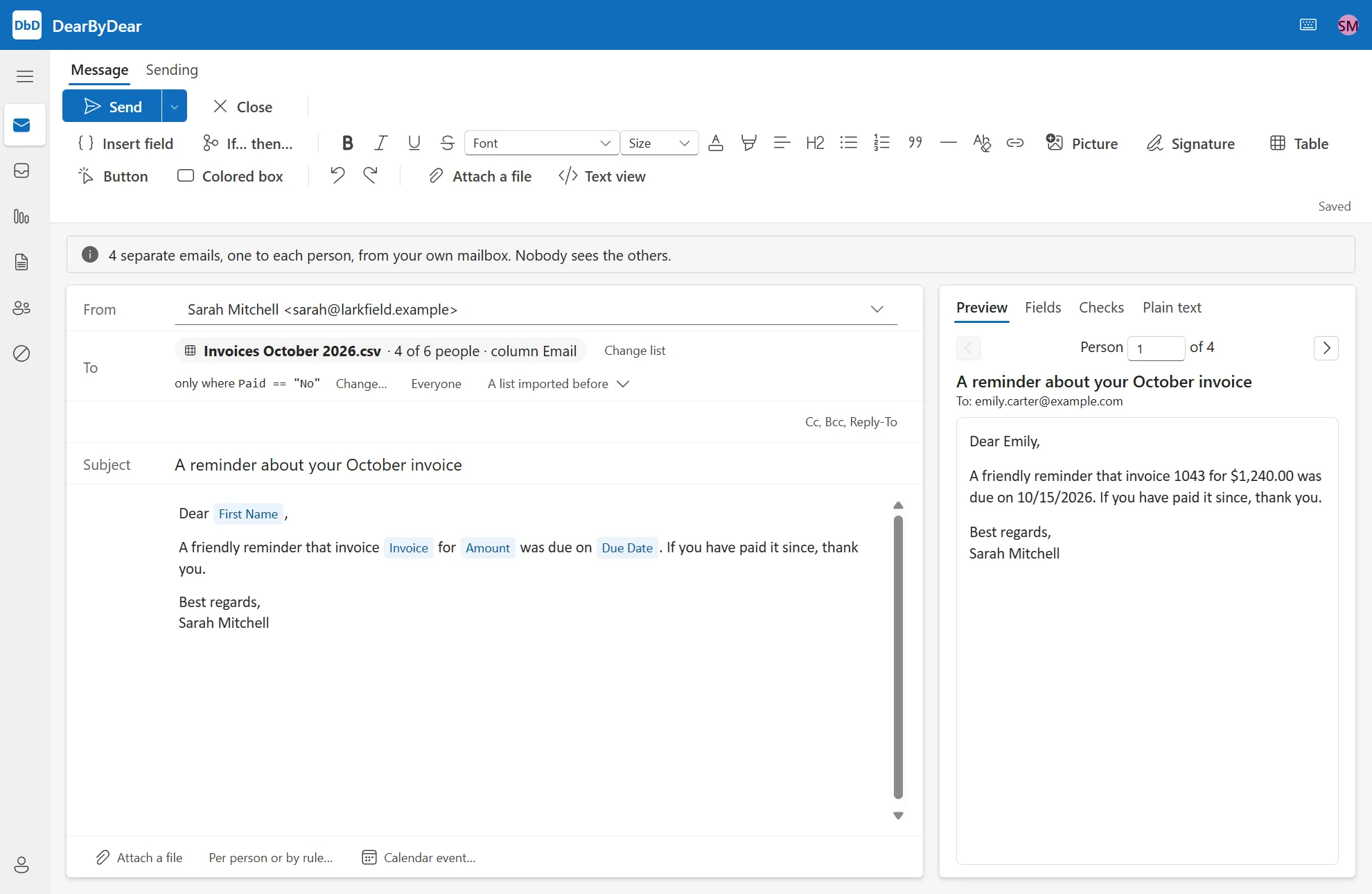
A mail merge filter sends the email to only some people on your list: the clients whose invoice is unpaid, the ones in California, the members due to renew. In DearByDear, Only some people…, on the To line, takes a condition on any column, and the merge goes to those rows alone while the file stays as it is. It works on any mail merge from Excel or CSV, a Google Sheet’s link or your contacts, and every count, the preview and the check follow the people it chose.
Any column · is, contains, greater than, empty · The list stays whole · Free up to 50 people a merge
How it works
- STOP 1Choose the listAn Excel or CSV file, a Google Sheet’s link, your contacts or your mailbox, as for any merge.
- STOP 2Only some people…On the To line, or in the first of a new merge’s steps: a column, how to compare, and a value. Paid is No.
- STOP 3Everything followsThe To line reads 4 of 6 people, the summary 4 separate emails, the preview Person 1 of 4, and the check says how many it leaves out.
- SENTOnly themThe merge goes to the people it chose. The others get nothing, and the send log says why.
The conditions you can use
Is, or is not: everyone whose Paid column says No, or whose State isn’t CA.
Paid is NoContains, does not contain, starts with, ends with: every company with Design in its name.
Company contains DesignIs greater than, is at least, is less than, is at most: invoices over a sum.
Amount is at least 1000Is empty, is not empty: the clients with a renewal date, or those still without one.
Renewal Date is not emptyFilter recipients in Word, or choose them here
In Word, Mailings → Edit Recipient List → Filter opens Filter Records: a column, a comparison and a value to compare to, with And or Or for more. Clearing the box beside a name leaves one person out (Microsoft). Word then sends through Outlook, with no file attached for anyone.
| What it does | Word’s mail merge | DearByDear |
|---|---|---|
| Choose people by a column | Filter Records | Only some people… |
| How many are left out, before sending | — | In the check, and in the send log after |
| Each chosen person’s own file | No attachments | By name or by rule |
| Sent from | Outlook | Your mailbox: Microsoft 365, Outlook.com, Gmail, any mail server |
Questions about filtering
How do I filter recipients in a Word mail merge?
Mailings, then Edit Recipient List, then Filter. In Filter Records, choose the column, the comparison and the value to compare to; And or Or adds another condition. Clearing the box beside a name in the recipient list leaves that one person out.
Does it change my spreadsheet?
No. The condition belongs to the merge. The list keeps every row, ready for the next merge to use whole or in part.
What happens to the people it leaves out?
They get nothing. The check before sending says how many it leaves out, and the send log lists them as not chosen by the merge’s condition.
Can I change it before sending?
Yes: Change… beside the condition picks another, and Everyone sends to the whole list again.
Can I send a payment reminder only to clients who haven’t paid?
Yes, with a Paid column in the list and the condition Paid is No. The whole job is in how to email invoices from Excel.
Can a condition also change the text?
Yes. The same kind of condition decides a sentence inside the email, for some people and not others: If, Then, Else in a mail merge.
Is it in the free version?
Yes. The free version has every feature, for merges of up to 50 people.
Sources
Each provider’s own pages, read on October 31, 2026. If it describes Word differently now, theirs is right.