Extract email addresses from Gmail
To extract email addresses from Gmail, Google gives you one list: the people you’ve emailed, saved in Google Contacts as Other contacts. For everyone who wrote to you, or only the emails under one label, DearByDear reads your Gmail itself. Choose the labels, the dates and the words to look for, and it makes a list of the people with their names, ready for Excel or a merge.
Free Gmail and Google Workspace · Connected with an app password · Reads only
- olivia.bennett@example.comOLIVIA BENNETT · 6 EMAILS
- james.walker@example.comJAMES WALKER · 3 EMAILS
- daniel.price@example.comNAME FROM THE ADDRESS
- notifications@calendar.exampleLEFT OUT
An example: everyone under the label Clients since January
How to export Gmail contacts and email addresses with Google Contacts
- STEP 1Open Google ContactsOn a computer: Other contacts doesn’t show on a phone.
- STEP 2Click Other contactsGoogle saves there the address of everyone you email who isn’t one of your contacts, unless that’s turned off.
- STEP 3Choose the peopleTick the ones you want, or all of them.
- DONEExport themAs a CSV file, which opens in Excel.
Those steps come from Google’s pages on Other contacts and on exporting contacts. The list holds only people you wrote to: someone who emailed you and never got an answer isn’t on it, and nothing can be chosen by label, date or words. Your saved contacts export the same way, from Contacts. Exporting your Gmail data with Google Takeout downloads the emails themselves, with their headers and attachments, not a list of addresses.
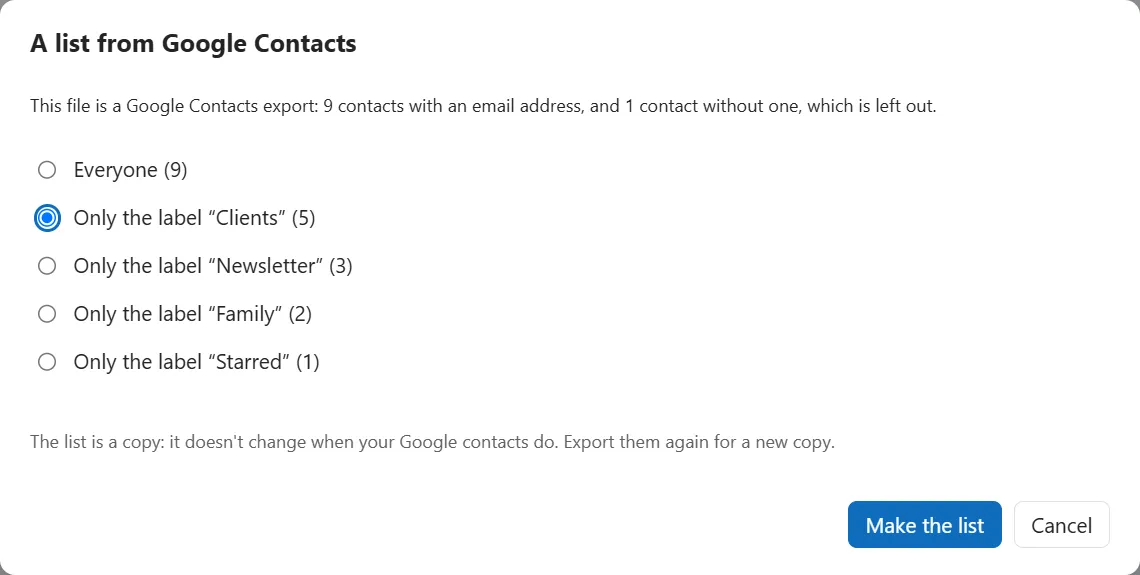
DearByDear reads the file Google Contacts exports as it is. Export your contacts as Google CSV, then choose Mailing lists → From Google Contacts… and the file. Each contact with an email address becomes a row, with their name, company and labels, and if your contacts have labels you can keep only one, such as Clients. Contacts without an address are left out and counted. The list is a copy, so export again when your contacts change.
Extract email addresses from Gmail by label, date or words
- STOP 1Connect GmailWith an app password, made in your Google account once 2-Step Verification is on. DearByDear shows each step, or read how to make a Gmail app password first.
- STOP 2Where to lookMailing lists → From my mailbox…, then the labels: the Inbox, your own labels, Sent Mail or All Mail, between two dates.
- STOP 3What to look forWords in the subject, the sender, the recipients or the text. Then whose addresses: From, Reply-To, To, Cc, Bcc or written in the text.
- LISTEDA mailing listEach person once, with their name and how often they wrote, or one row per email. Export it to Excel, or use it for a mail merge in Gmail.
Which Gmail labels to choose
Gmail shows its labels to mail apps as folders (Google’s page for developers), so DearByDear lists them by name, with Gmail’s own under [Gmail]. An archived email leaves the Inbox but stays under All Mail.
| The list you want | Choose |
|---|---|
| Everyone who emailed you, archived emails included | All Mail, taking the From addresses |
| Everyone you emailed | Sent Mail, taking To, Cc and Bcc |
| The people in one label | That label, and Also the folders inside them for its nested labels |
| Who is in your inbox now | The Inbox, chosen to begin with |
| Customers whose address is in an order notification | The label the notifications go to, with addresses written in the text after words such as “Customer email:” |
Gmail email extractors, compared
| What it does | Google Contacts’ Other contacts | DearByDear |
|---|---|---|
| Nothing to install, no app password | Yes | No: an app and an app password |
| People who emailed you | Only those you wrote back to | Yes |
| By label, by dates, by words in the subject or text | No | Yes |
| Addresses written in the text | No | Yes |
| How often each person wrote, first and last seen | No | Yes |
| Your own, automatic and throwaway addresses left out | No, by hand | Yes |
| Updated later with newer emails | Export again | Yes, with Update now |
Extractor extensions for Chrome read your Gmail with the permissions you give them. Before you allow one, read what it says it does with your emails and the list it makes. DearByDear makes the list on your computer: its servers never see your list or your emails, which stay there, encrypted.
Questions about extracting addresses from Gmail
Does it change anything in my Gmail?
No. DearByDear opens each label to read it only: no email is moved, labeled, deleted or marked as read.
Is extracting addresses from Gmail free?
Yes. Making the list and exporting it to Excel or CSV is free. The free version’s limit is on merges, 50 people each, and a license sends to everyone: see DearByDear pricing.
Does it work with Google Workspace?
Yes, if the account can make app passwords. Google says some work and school accounts can’t, depending on their administrator. Then ask the administrator to allow them.
Is it slower when it looks in the text?
Yes. To begin with, DearByDear reads only each email’s sender, recipients, subject and date. Words in the text, or addresses written in it, mean downloading each email that might match, which takes longer in a large mailbox.
What about dots and +tags in Gmail addresses?
Gmail ignores dots, so emily.carter@gmail.com and emilycarter@gmail.com are one person, and one row. An address with a +tag joins the plain address too, unless you keep each form apart. The columns and leave-outs are the same as when you extract email addresses from Outlook.
Can Claude make the list?
Yes, in Claude Desktop with the DearByDear extension, or ChatGPT’s Codex in the ChatGPT desktop app. Ask in words: “make a list of everyone under the label Clients who wrote this year.” What it reads to do so is part of your own conversation, under your Claude or ChatGPT account’s terms.