Verify an email list before sending
To verify an email list, most people want a service that asks each address’s mail server whether the mailbox is real. DearByDear doesn’t: it never contacts a mail server about one address. Here’s what that kind of check does, when it’s worth paying for, and what DearByDear checks instead, for free, before and after you send.
Free up to 50 people a merge · Nothing uploaded to check your list · Typos fixed with one click
What verifying an email list means
An email verification service runs a list through a set of checks before you send to it, and sorts each address into valid, invalid or somewhere in between. Most check for the same handful of things.
Whether the address is written as one: one @, a domain with a dot, no spaces or stray punctuation. The easiest thing to catch, and the easiest to miss by eye in a long list.
jane.example.com → invalidWhether the domain even has a mail server, found by looking up its MX record in DNS. A domain with none, or one that refuses mail outright, can’t receive anything, whoever the mailbox belongs to.
closed-company.example → no mail serverWhether one particular mailbox is still there, found by asking the domain’s mail server directly, in an SMTP conversation that stops short of sending the email. This is what most people mean by “verify an email list.”
RCPT TO: jane@example.comA catch-all domain accepts email sent to any address at it, even ones nobody reads. Asking its mail server about one mailbox gives no real answer, so it’s flagged as unsure rather than valid.
catch-all → unknownA disposable address is made to be thrown away after a few minutes. A role address such as info@ or sales@ reaches a department, not one person. Neither is wrong, but both are worth knowing before you send.
info@, sales@, mailinator.comWhen a verification service is worth it
A list that hasn’t been emailed in a year or more has mailboxes that quietly closed since. A verification service catches those before a wall of bounces does.
A list you didn’t build yourself, such as one handed over by a colleague or a CSV exported from another tool, carries addresses nobody on your side has checked. Worth a verification pass once, before you write to it.
A send going out to thousands of people at once leaves little room to notice a bad address once it’s running. Checking first, rather than finding out from the bounces, is often worth the service’s fee for a one-off like this.
What DearByDear checks, free, before you send
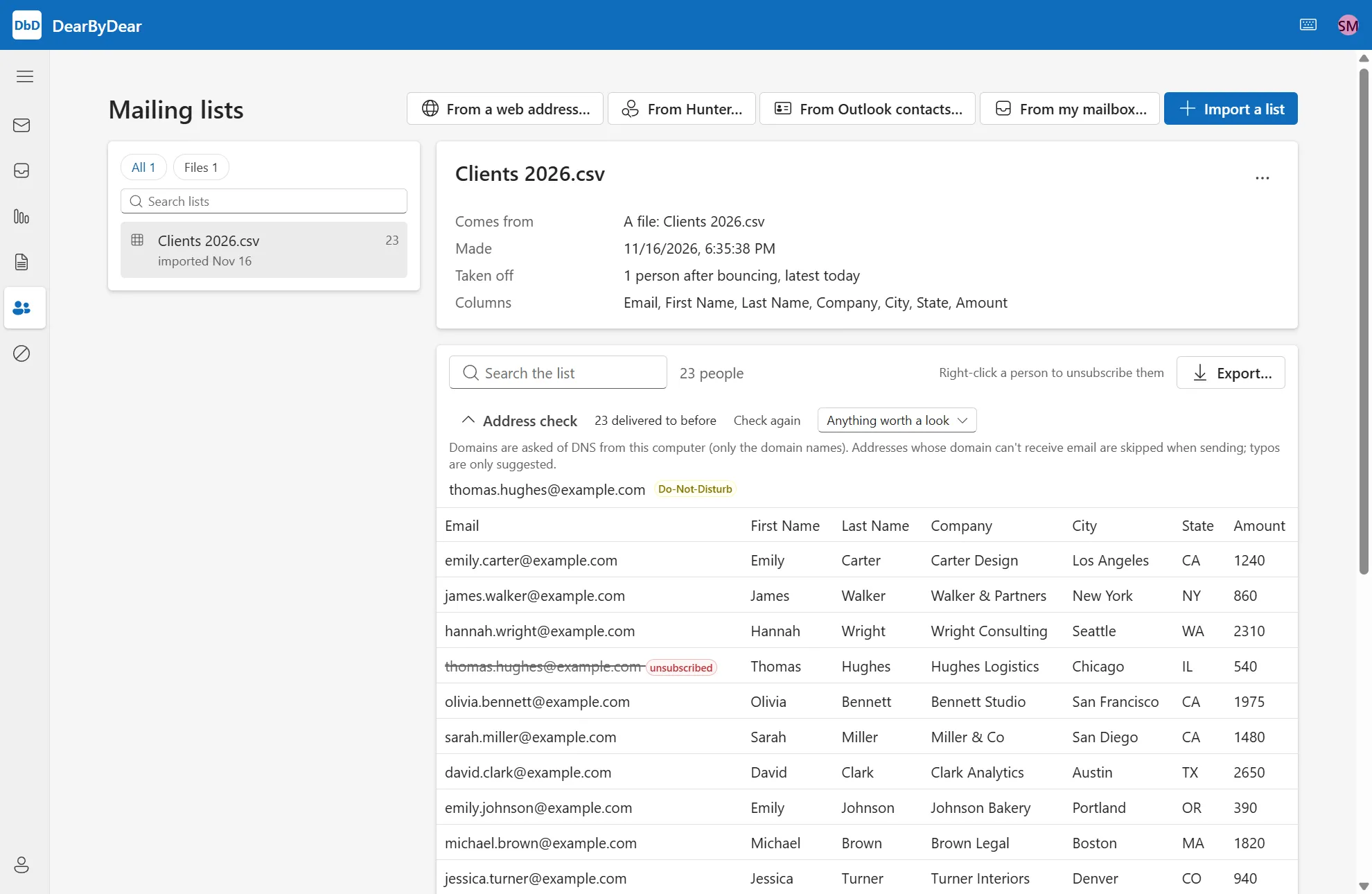
- STOP 1Every address checked on importEach domain is asked of DNS — only the domain name, never an address — when a list comes in, and again when it’s chosen for an email. The address check in Mailing lists flags one that doesn’t exist or takes no email, and offers a one-click fix for a likely typo.
- STOP 2Clean up… on any listLeaves out automatic senders, colleagues at your own domain, role addresses such as info@, throwaway addresses and addresses at a domain that can’t receive email. It fixes common typos such as gmial.com first, so a mistyped address is repaired, not dropped. It shows every change first, and nothing changes until you click Clean up.
- READYBefore you click SendOne email per address (someone listed twice is skipped), and your Do-Not-Disturb list skipped too. Preview each email before sending, and Check and send, both show exactly who is skipped, and why.
What happens after you send
DearByDear reads bounces from the mailbox for 30 days after a merge, while DearByDear or Claude Desktop is running. An address that doesn’t exist — Gmail’s address not found bounce is a common one — goes onto your Do-Not-Disturb list and comes off the mailing list it was sent from. A temporary bounce, such as a full mailbox, only does the same after the third.
A merge pauses itself when more than 5% of the emails sent bounce because the address doesn’t exist — at least 3, once 20 have gone out. Sending on to a list like that can harm the sender’s reputation, so DearByDear stops and says why instead of continuing. The addresses already flagged aren’t emailed again, and after resuming, only bounces from then on count.
What DearByDear doesn’t check
DearByDear never asks a mail server whether one mailbox exists. That conversation — an SMTP exchange that stops short of sending the email — is blocked by most connections, refused outright by the big providers, and a way to get the sender’s own address blocklisted. It doesn’t test for a catch-all domain either. Both are what an email verification service is for.
DearByDear’s servers never see your mailing list or your actual emails: they stay private on your computer, encrypted. A verification service needs your list uploaded to it, so it can ask each mailbox’s question on your behalf.
Verify an email list, compared
| What it does | Email verification services | DearByDear |
|---|---|---|
| Asks whether each mailbox exists | Yes, by asking its mail server | No, never |
| Detects catch-all domains | Yes | No |
| What the checks cost | Usually paid, by the address | Nothing, in the free version too |
| Your list stays on your own computer | No: sent to them to check | Yes, encrypted |
| Likely typos fixed with one click | Varies | Yes |
| Your Do-Not-Disturb list skipped when sending | No: they don’t send | Yes |
| Bounces read after you send | No: a check made before sending | Yes, for 30 days |
| Pauses the merge if many addresses bounce | No: they don’t send | Yes |
Questions about verifying an email list
Does DearByDear verify that a mailbox exists?
No. It never contacts a mail server about one address: that check is blocked by most connections, refused outright by the big providers, and a way to get the sender’s own address blocklisted. What it does check, for free: how the address is written, whether its domain takes email, likely typos, people listed twice and your Do-Not-Disturb list.
What does an email verification service check that DearByDear doesn’t?
Whether one particular mailbox still exists, and whether its domain is a catch-all that accepts any address. Both need asking the domain’s mail server directly, which DearByDear doesn’t do.
When is a verification service worth paying for?
For an old list, one someone else gave you, or before a large one-off send. For a list you keep using yourself, DearByDear’s own checks and its Do-Not-Disturb list usually cover it.
Does DearByDear upload my list to check it?
No. DearByDear’s servers never see your mailing list or your actual emails: they stay private on your computer, encrypted. A verification service needs your list uploaded to it, so it can ask about each address.
What happens to an address that bounces after I send?
DearByDear reads bounces from your mailbox for 30 days while DearByDear or Claude Desktop is running. An address that doesn’t exist goes onto your Do-Not-Disturb list and comes off the mailing list it was sent from. A temporary bounce, such as a full mailbox, only does the same after the third.
What is a catch-all domain, and why does it matter?
A catch-all domain accepts email sent to any address at it, even ones nobody reads, so its mail server can’t really confirm whether one mailbox is used. A verification service flags this rather than calling the address valid or invalid. DearByDear doesn’t test for it.