Mail merge calendar invite
A mail merge calendar invite attaches a calendar event to each person’s own email, instead of one shared Outlook invitation. Word’s mail merge to email can’t send one: it can’t attach anything at all. In DearByDear, Calendar event…, beside Attach a file, attaches each person’s own event as an .ics file instead, each part filled in from the list’s own fields, from a mail merge from Excel or CSV, a Google Sheet’s link, your contacts or your mailbox. It’s an event to add, not a meeting request, so people still say they’re coming by replying.
Calendar event… · .ics, one per person · METHOD:PUBLISH, not a meeting request · Free up to 50 people a merge
- emily.carter@example.comWINTER DINNER FOR EMILY.ICS
- james.walker@example.comWINTER DINNER FOR JAMES.ICS
- olivia.bennett@example.comSKIPPED · DATE CAN’T BE READ
Can Word’s or Outlook’s mail merge send a calendar invite?
No. Outlook has no mail merge of its own: the mail merge people mean by “Outlook mail merge” is Word’s, sending through it, and Word’s mail merge to email sends a plain or HTML message, one to each address, with, Microsoft says, “you cannot add attachments” to it — a calendar invite included. Outside mail merge, Outlook has no built-in way around that either: asked whether it’s possible to send separate calendar invites to each person, Microsoft’s own support forum calls it “not yet feasible”, and suggests hiding the attendee list on one shared invite instead. A different answer about mail merge itself is blunter: “No, you can’t do that via a Mail Merge.”
Either way, everyone still gets the same event off the same invite. DearByDear attaches a different one to each person’s own email, the way its mail merge already gives each person their own message and their own file.
Calendar event…, beside Attach a file
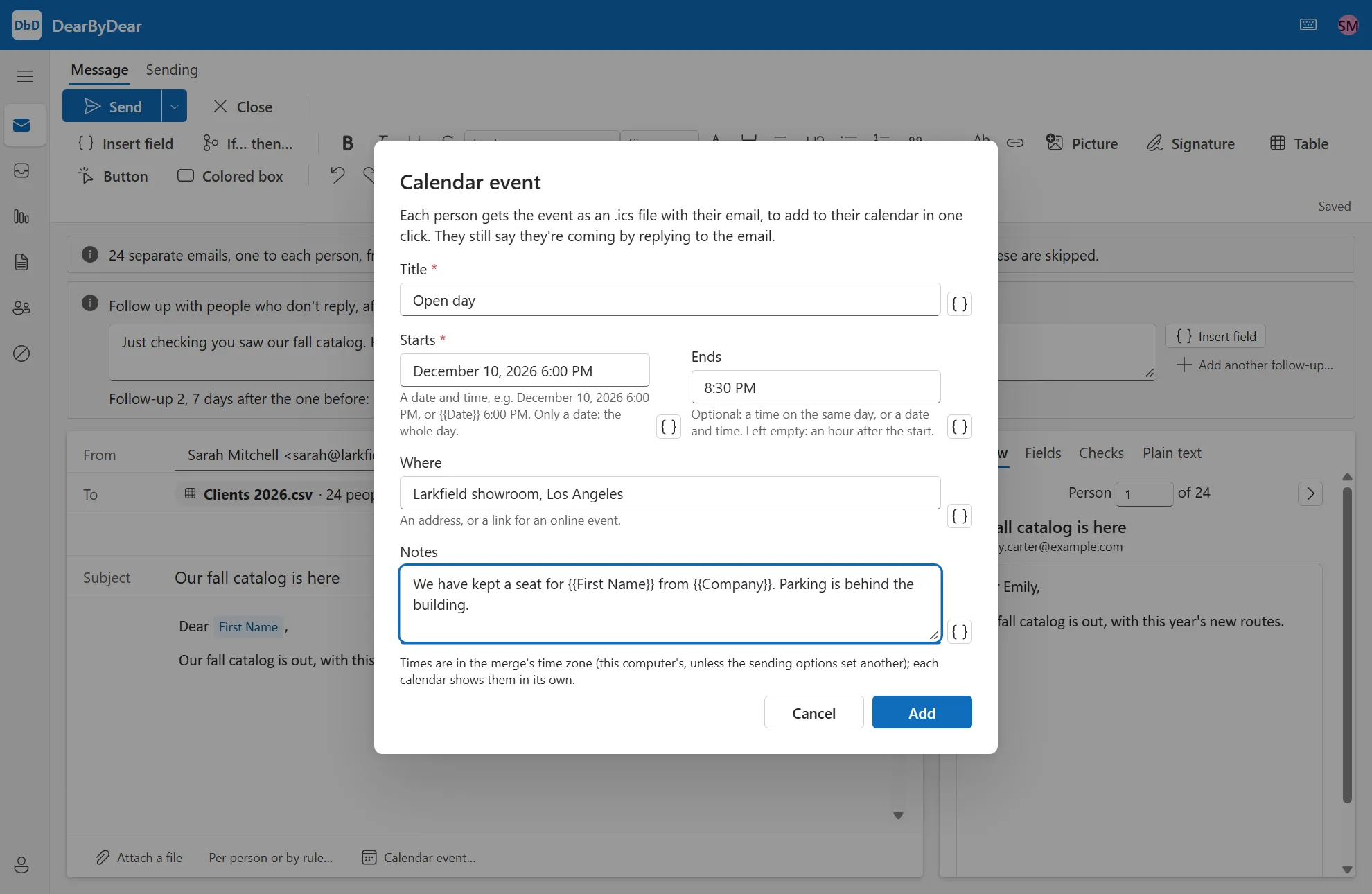
In the email editor, next to Attach a file, DearByDear adds Calendar event…. It opens a dialog for the event’s parts, each able to take a field from the list, the same way the rest of the email does:
What’s in the calendar, required. Any field can go in it.
Winter dinner for {{First Name}}Required: a date and time, or a date on its own for the whole day.
{{Date}} 6:00 PMOptional: a time on the same day, or a date and time of its own. Left empty, the event is an hour long.
9:00 PMAn address, or a link for an online event.
The Larkfield RoomAnything else: what to bring, a dress code, directions.
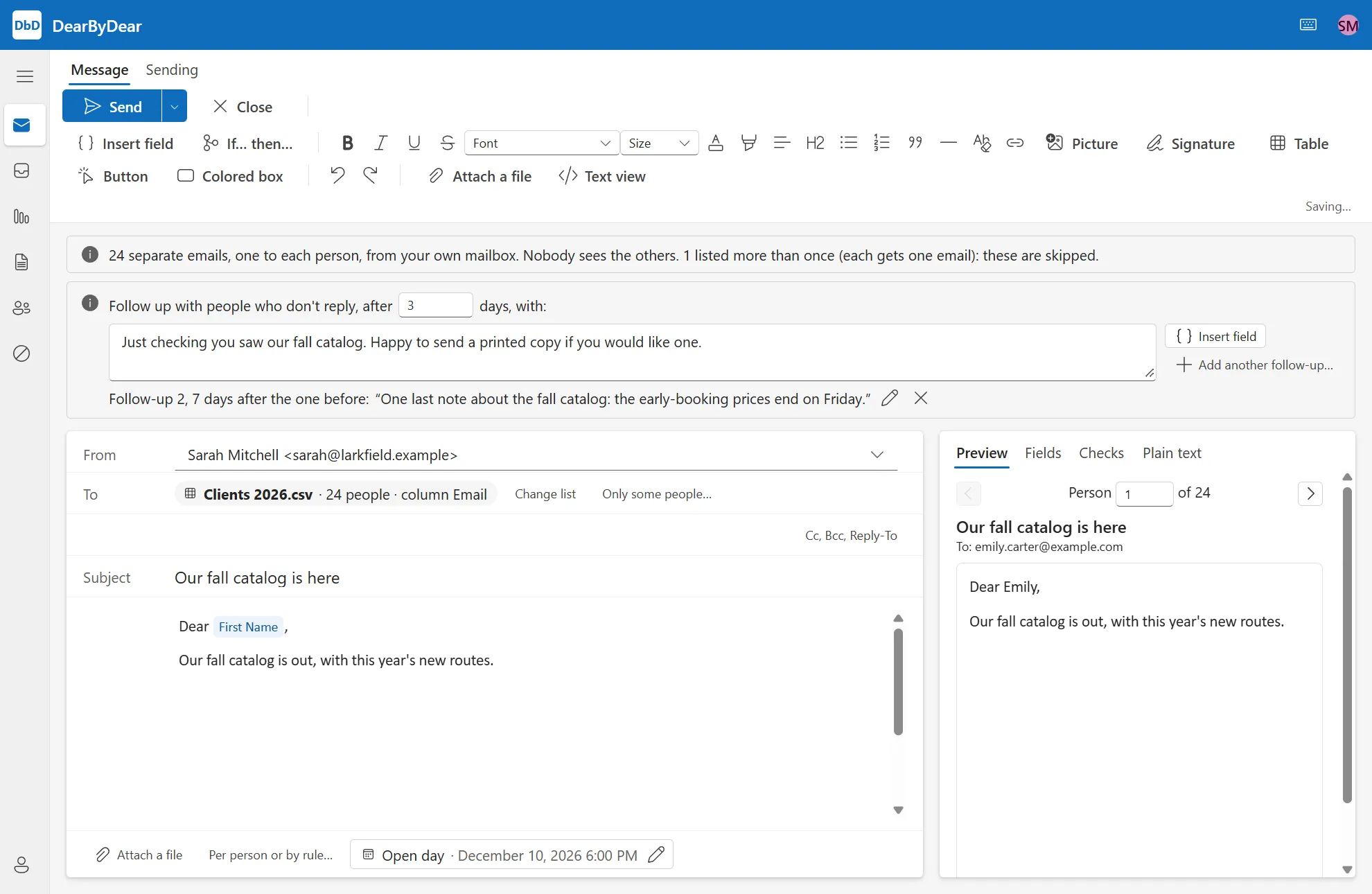
Smart casual.Add it, and it becomes a chip beside Attach a file: a calendar icon, the event’s title and its start, with a pencil to change it.
An event to add, not a meeting request
Each .ics is built with METHOD:PUBLISH: an event to add to a calendar, the way a holiday or a reminder is, not an invitation a calendar can Accept, Decline or mark Tentative. People still say they’re coming by replying to the email itself, which DearByDear reads; if they don’t, a follow-up email can ask again a few days later.
The same event goes with that person’s email wherever it goes: a test email to yourself, a draft left for you to review before sending, and the email once it’s sent. The preview for each person includes their event too, named after it, such as “Winter dinner for Emily.ics.”
Dates it can read, a person it skips
A date and time in several common forms, typed or read from the list’s own column.
2026-12-10 18:00 · 12/10/2026 6:00 PM · 10.12.2026 18:00 · December 10, 2026 at 6:00 PMWith no time, the event is for the whole day.
December 10, 2026Leaving Ends empty makes the event an hour long, from its start.
— an hour, by defaultA start DearByDear can’t read as a date skips that person, with the reason, in the send log, the preview and a test email.
isn’t a date DearByDear can readEvery merge has one time zone: your computer’s, unless you set another when you schedule a mail merge. DearByDear reads each person’s date in that zone, then sends the event in UTC: a 6:00 PM dinner set in Los Angeles leaves as 2:00 AM UTC the next day, for each person’s own calendar to show back in its own time zone. The event keeps the same UID each time it’s made for that person, the way the iCalendar format tells a calendar it’s the same event again, not a new one.
A standard file, not yet opened in a real calendar
Each .ics is written in the standard iCalendar format: the one Outlook imports, Google Calendar imports, and Apple’s Calendar opens from an email, by their own instructions. DearByDear’s own event is tested in the engine and in a dry-run email, not yet opened in a real Outlook, Google Calendar or Apple Calendar, so this page says what the file is, not that it works with any of them.
It doesn’t track who’s coming inside a calendar either: there’s no RSVP for a calendar to collect, only the reply DearByDear reads from the mailbox. And the gallery’s own invitation templates don’t carry an event yet: add Calendar event… to one you start from a template, or to any other email. Send event invitations by email has the rest of that job, guest list to reminder.
Mail merge and calendar invites, compared
| What it does | Word and Outlook | DearByDear |
|---|---|---|
| A calendar invite attached to the email | No, no attachments at all | Yes, an .ics for each person |
| A separate event for each person | Only by forwarding each one by hand, or a script | Yes, one attached to each email |
| How people say they’re coming | Accept, Decline or Tentative, in Outlook | By replying to the email, read by DearByDear |
| Sent from | Outlook, as a meeting request | Your own mailbox: Microsoft 365, Outlook.com, Gmail, any mail server |
Questions about calendar invites
Is the calendar event a meeting request?
No. Each .ics is built as METHOD:PUBLISH, an event to add to a calendar, with no ORGANIZER and no ATTENDEE line, so there’s nothing for a calendar to Accept, Decline or mark Tentative. People still say they’re coming by replying to the email, which DearByDear reads.
What dates and times can it read?
As written, or as a spreadsheet shows them: a date and time such as 2026-12-10 6:00 PM, 12/10/2026 6:00 PM, or December 10, 2026 at 6:00 PM. Dates with slashes are read the way your list writes them: a date such as 25/12/2026 settles it, and otherwise DearByDear follows how your computer writes dates, and Check and send says how it read one such as 10/12/2026. A list that writes them both ways is stopped before sending. Preview each email shows each person’s event as it was read. A date with no time is for the whole day, and leaving Ends empty makes the event an hour long.
What happens if someone’s date can’t be read?
That person is skipped, and the send log, the preview and a test email all say why, such as “the calendar event’s start isn’t a date DearByDear can read.” Everyone else still gets their email and their event.
What time zone are the events in?
The merge’s own: your computer’s time zone, unless the sending options set another. DearByDear reads each person’s date in that zone, then sends the event in UTC, so a calendar reading it shows it back in its own time zone.
Will the .ics open in Outlook, Google Calendar or Apple Calendar?
It’s written in the standard iCalendar format those three import, by their own instructions. DearByDear hasn’t opened one in a real Outlook, Google Calendar or Apple Calendar yet, so this page says what the file is, not that it works with any of them.
Can I add an event to the gallery’s invitation email?
Not on its own yet: the gallery’s templates don’t carry an event of their own. Add Calendar event… to one you start from a template, the same as to any other email, and it carries one too.
Is it in the free version?
Yes. The free version has every feature, the calendar event included, for merges of up to 50 people.
Sources
Each provider’s own pages, read on November 5, 2026. If Microsoft, Google or Apple describe it differently now, theirs is right.
- Microsoft: use mail merge to send bulk email messages
- Microsoft Q&A: mail merge calendar invites in Outlook
- Microsoft Q&A: is there a way to bulk-send calendar invites?
- Microsoft: import calendars into Outlook
- Google Calendar Help: import events
- Apple Support: send and receive invitations in Calendar on Mac